assembly -- Functions to group and move together 3D objects
convenient data structures and functions for putting parts together and explode them to other functions
Solid(*args, **kwargs)

Bases: dict
Movable group of objects
A Solid is just like a dictionary with a pose.
Examples:
>>> mypart = icosphere(vec3(0), 1)
>>> s = Solid(part=mypart, anything=vec3(0))   # create a solid with whatever inside
>>> st = s.transform(vec3(1,2,3)) # make a new translated solid, keeping the same content without copy
>>> # use content as attributes
>>> s.part
<Mesh ...>
>>> # put any content in as a dict
>>> s['part']
<Mesh ...>
>>> s['whatever'] = vec3(5,2,1)
Source code in madcad/assembly/__init__.py
43 44 45 46 47 | |
pose
instance-attribute

placement matrix, it defines a base in which other attributes are displayed
transform(value)

Displace the solid by the transformation
Source code in madcad/assembly/__init__.py
49 50 51 | |
place(*args, **kwargs)

Strictly equivalent to .transform(placement(...)), see placement for parameters specifications.
Source code in madcad/assembly/__init__.py
53 54 55 | |
loc(*args)

chain transforms in the given key path
Source code in madcad/assembly/__init__.py
57 58 59 60 | |
deloc(*args)

return the object at the given key path with the chain of transforms applied to it
Source code in madcad/assembly/__init__.py
62 63 64 65 | |
append(value)

Add an item in self.content, a key is automatically created for it and is returned
Source code in madcad/assembly/__init__.py
82 83 84 85 86 87 | |
display(scene)

Source code in madcad/assembly/__init__.py
95 96 97 | |
placement(*pairs, precision=0.001)

Return a transformation matrix that solved the placement constraints given by the surface pairs
Parameters:
| Name | Type | Description | Default |
|---|---|---|---|
pairs
|
a list of pairs to convert to kinematic joints
|
()
|
|
precision
|
surface guessing and kinematic solving precision (distance) |
0.001
|
Each pair define a joint between the two assumed solids (a solid for the left members of the pairs, and a solid for the right members of the pairs). Placement will return the pose of the first relatively to the second, satisfying the constraints.
suppose we have those parts to assemble and it's hard to guess the precise pose transform between them
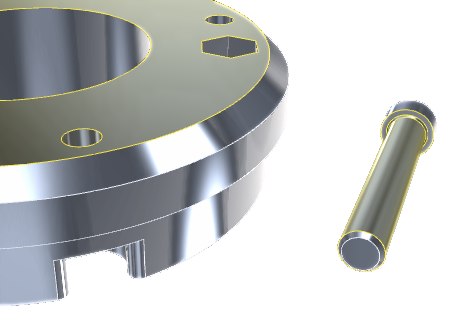
placement gives the pose for the screw to make the selected surfaces coincide
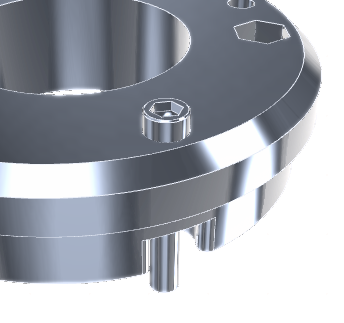
Examples:
>>> # get the transformation for the pose
>>> pose = placement(
...             (screw['part'].group(0), other['part'].group(44)),  # two cylinder surfaces: Cylindrical joint
...             (screw['part'].group(4), other['part'].group(25)),    # two planar surfaces: Planar joint
...             )  # solve everything to get solid's pose
>>> # apply the transformation to the solid
>>> screw.pose = pose
>>> # or
>>> screw.place(
...             (screw['part'].group(0), other['part'].group(44)),
...             (screw['part'].group(4), other['part'].group(25)),
...             )
>>> screw.place(
...             (Revolute, screw['axis'], other['screw_place']),
...             )
Source code in madcad/assembly/__init__.py
107 108 109 110 111 112 113 114 115 116 117 118 119 120 121 122 123 124 125 126 127 128 129 130 131 132 133 134 135 136 137 138 139 140 141 142 143 144 145 146 147 148 149 150 151 152 153 154 155 156 157 158 159 160 161 162 | |
explode(solids, spacing=1, offsets=None)

Move the given solids away from each other in the way of an exploded view.
It makes easier to seen the details of an assembly . See explode_offsets for the algorithm.
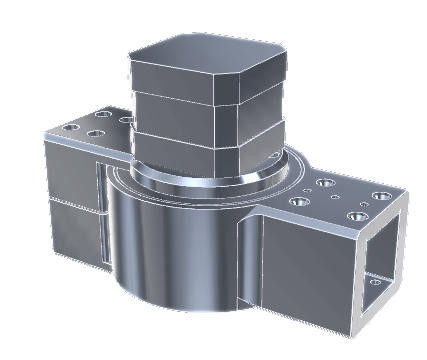
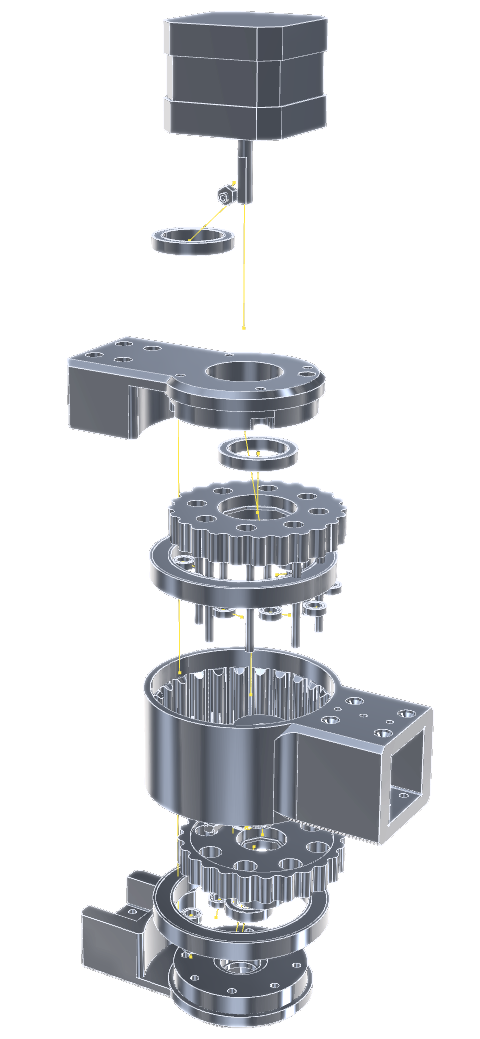
Parameters:
| Name | Type | Description | Default |
|---|---|---|---|
solids
|
a list of solids (copies of each will be made before displacing) |
required | |
spacing
|
spacing factor, 0 for no displacement, 1 for normal displacement |
1
|
|
offsets
|
if given, must be the result of |
None
|
Examples:
>>> # pick some raw model and separate parts
>>> imported = read(folder+'/some_assembly.stl')
>>> imported.mergeclose()
>>> parts = []
>>> for part in imported.islands():
...     part.strippoints()
...     parts.append(Solid(part=segmentation(part)))
...
>>> # explode the assembly to look into it
>>> exploded = explode(parts)
Source code in madcad/assembly/__init__.py
165 166 167 168 169 170 171 172 173 174 175 176 177 178 179 180 181 182 183 184 185 186 187 188 189 190 191 192 193 194 195 196 197 198 | |
explode_offsets(solids, spacing=0.0)

return offsets for an exploded view
Parameters:
| Name | Type | Description | Default |
|---|---|---|---|
solids
|
list[SolidBox]
|
objects to explode, described as boundingboxes in their own space |
required |
spacing
|
spacing ratio relative to objects sizes (0 means no spacing, 0.5 is a good value) |
0.0
|
Source code in madcad/assembly/__init__.py
212 213 214 215 216 217 218 219 220 221 222 223 224 225 226 227 228 229 230 231 232 233 234 235 236 237 238 239 240 241 242 243 244 245 246 247 248 249 250 251 252 253 254 255 256 257 258 259 260 261 262 263 264 265 266 267 268 269 270 271 272 273 274 275 276 277 278 279 280 281 282 283 284 285 286 287 288 289 290 291 292 293 294 295 296 | |