mathutils -- All the basic math types and functions
Most of the names here are coming from the glm module. But the goal is to harvest at one point all the basic math functions and objects that are used all around madcad.
Tip
All the present functions and types are present in the root madcad module.
Most common glm types
All following objects implement the common operators + - * / <> ==
vec3 = dvec3
module-attribute

mat3 = dmat3
module-attribute

mat4 = dmat4
module-attribute

quat = dquat
module-attribute

All glm types exists with several element types and in several precision:
| Prefix | Precision |
|---|---|
| d | f64 aka double precision floating point |
| f | f32 aka simple precision floating point |
| i | i32 aka integer |
| i16 | 16 bits integer |
| i8 | 8 bits integer aka byte |
| u | unsigned integer (also declines in u16 and u32) |
| b | bit aka boolean |
- Precision specification is put as prefix:
dvec3, fvec3, imat4. Notation without prefix refers to the madcad implementation precision: float64 (prefix 'd'). - Object dimension is put as suffix.
In this documentation, when we refer to a 'vector' without explicit type, we obviously mean a vec3 aka. dvec3.
Note
The default glm_ precision type is float32 (prefix 'f'). For convenience, these are overriden in madcad to use float64 for a better precision.
Common vector operations
dot()
builtin

dot(x: number, y: number) -> float
Returns the dot product of x and y, i.e., result = x * y.
dot(x: vecN, y: vecN) -> number
Returns the dot product of x and y, i.e., result = x[0] * y[0] + x[1] * y[1] + ...
dot(x: quat, y: quat) -> float
Returns dot product of x and y, i.e., x[0] * y[0] + x[1] * y[1] + ...
cross()
builtin

cross(x: vec3, y: vec3) -> vec3
Returns the cross product of x and y.
cross(x: quat, y: quat) -> quat
Compute a cross product.
length()
builtin

length(x: float) -> float
Returns the length of x, i.e., abs(x).
length(x: vecN) -> float
Returns the length of x, i.e., sqrt(x * x).
length(x: quat) -> float
Returns the norm of a quaternion.
distance()
builtin

distance(p0: float, p1: float) -> float
Returns the distance between p0 and p1, i.e., length(p0 - p1).
distance(p0: vecN, p1: vecN) -> float
Returns the distance between p0 and p1, i.e., length(p0 - p1).
anglebt(x, y)

Angle between two vectors
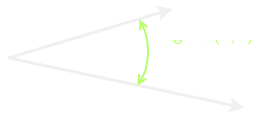
The result is not sensitive to the lengths of x and y
Source code in madcad/mathutils.py
104 105 106 107 108 109 110 111 112 | |
arclength(p1, p2, n1, n2)

Length of an arc between p1 and p2, normal to the given vectors in respective points
Source code in madcad/mathutils.py
114 115 116 117 118 119 | |
project(vec, dir)

Component of vec along dir, equivalent to :code:dot(vec,dir) / dot(dir,dir) * dir
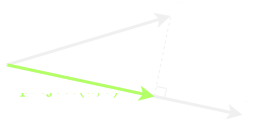
The result is not sensitive to the length of dir
Source code in madcad/mathutils.py
121 122 123 124 125 126 127 128 129 130 131 | |
noproject(vec, dir)

Components of vec not along dir, equivalent to :code:vec - project(vec,dir)
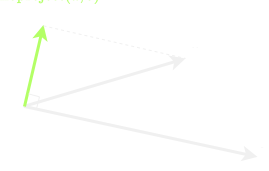
The result is not sensitive to the length of dir
Source code in madcad/mathutils.py
134 135 136 137 138 139 140 141 | |
unproject(vec, dir)

Return the vector in the given direction as if vec was its projection on it, equivalent to :code:dot(vec,vec) / dot(vec,dir) * dir
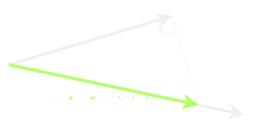
The result is not sensitive to the length of dir
Source code in madcad/mathutils.py
143 144 145 146 147 148 149 150 151 152 153 | |
reflect()
builtin

reflect(I: float, N: float) -> float
For the incident vector I and surface orientation N, returns the reflection direction:
result = I - 2.0 * dot(N, I) * N.
reflect(I: vecN, N: vecN) -> vecN
For the incident vector I and surface orientation N, returns the reflection direction:
result = I - 2.0 * dot(N, I) * N.
perp(v)

Perpendicular vector to the given vector

Source code in madcad/mathutils.py
159 160 161 162 163 164 | |
See the glm complete reference
Transformations
transform(*args)

Create an affine transformation matrix.
Supported inputs
:mat4: obviously return it unmodified
:float: scale using the given ratio
:vec3: translation only
:quat, mat3, mat4: rotation only
:(vec3,vec3), (vec3,mat3), (vec3,quat): (o,T) translation and rotation
:(vec3,vec3,vec3): (x,y,z) base of vectors for rotation
:(vec3,vec3,vec3,vec3): (o,x,y,z) translation and base of vectors for rotation
Source code in madcad/mathutils.py
207 208 209 210 211 212 213 214 215 216 217 218 219 220 221 222 223 224 225 226 227 228 229 230 231 232 233 234 235 236 237 238 | |
translate()
builtin

translate(v: vec3) -> mat4x4
Builds a translation 4 x 4 matrix created from a vector of 3 components.
translate(v: vec2) -> mat3x3
Builds a translation 3 x 3 matrix created from a vector of 2 components.
translate(m: mat4x4, v: vec3) -> mat4x4
Builds a translation 4 x 4 matrix created from a vector of 3 components.
m is the input matrix multiplied by this translation matrix
translate(m: mat3x3, v: vec2) -> mat3x3
Builds a translation 3 x 3 matrix created from a vector of 2 components.
m is the input matrix multiplied by this translation matrix
rotate()
builtin

rotate(angle: number, axis: vec3) -> mat4x4
Builds a rotation 4 x 4 matrix created from an axis vector and an angle.
rotate(angle: number) -> mat3x3
Builds a rotation 3 x 3 matrix created from an angle.
rotate(m: mat4x4, angle: number, axis: vec3) -> mat4x4
Builds a rotation 4 x 4 matrix created from an axis vector and an angle.
m is the input matrix multiplied by this translation matrix
rotate(m: mat3x3, angle: number) -> mat3x3
Builds a rotation 3 x 3 matrix created from an angle.
m is the input matrix multiplied by this translation matrix
rotate(v: vec2, angle: float) -> vec2
Rotate a two dimensional vector.
rotate(v: vec3, angle: float, normal: vec3) -> vec3
Rotate a three dimensional vector around an axis.
rotate(v: vec4, angle: float, normal: vec3) -> vec4
Rotate a four dimensional vector around an axis.
rotate(q: quat, angle: float, axis: vec3) -> quat
Rotates a quaternion from a vector of 3 components axis and an angle.
scaledir(dir, factor=None)

Return a mat3 scaling in the given direction, with the given factor (1 means original scale)

If factor is None, the length of dir is used, but it can leads to precision loss on direction when too small.
Source code in madcad/mathutils.py
179 180 181 182 183 184 185 186 187 188 189 | |
scale()
builtin

scale(v: vec3) -> mat4x4
Builds a scale 4 x 4 matrix created from 3 scalars.
scale(v: vec2) -> mat3x3
Builds a scale 3 x 3 matrix created from a vector of 2 components.
scale(m: mat4x4, v: vec3) -> mat4x4
Builds a scale 4 x 4 matrix created from 3 scalars.
m is the input matrix multiplied by this translation matrix
scale(m: mat3x3, v: vec2) -> mat3x3
Builds a scale 3 x 3 matrix created from a vector of 2 components.
m is the input matrix multiplied by this translation matrix
rotatearound(angle, *args)

Return a transformation matrix for a rotation around an axis
rotatearound(angle, axis) rotatearound(angle, origin, dir)
Source code in madcad/mathutils.py
191 192 193 194 195 196 197 198 199 200 201 202 203 204 205 | |
dirbase(dir, align=vec3(1, 0, 0))

Return a base using the given direction as z axis (and the nearer vector to align as x)
Source code in madcad/mathutils.py
166 167 168 169 170 171 172 173 174 175 176 177 | |
transpose()
builtin

transpose(x: matNxM) -> matMxN
Returns the transposed matrix of x.
inverse()
builtin

inverse(m: matSxS) -> matSxS Return the inverse of a squared matrix. inverse(q: quat) -> quat Return the inverse of a quaternion.
affineInverse()
builtin

affineInverse(m: matSxS) -> matSxS Fast matrix inverse for affine matrix.
angleAxis()
builtin

angleAxis(angle: float, axis: vec3) -> quat Build a quaternion from an angle and a normalized axis.
Interpolation functions
mix()
builtin

mix(x: number, y: number, a: float) -> number
Returns x * (1.0 - a) + y * a, i.e., the linear blend of x and y using the floating-point
value a. The value for a is not restricted to the range [0, 1].
mix(x: number, y: number, a: bool) -> number
Returns y if a is True and x otherwise.
mix(x: vecN, y: vecN, a: fvecN) -> vecN
Returns x * (1.0 - a) + y * a, i.e., the linear blend of x and y using the floating-point
value a. The value for a is not restricted to the range [0, 1].
mix(x: vecN, y: vecN, a: bvecN) -> vecN
For each component index i:
Returns y[i] if a[i] is True and x[i] otherwise.
mix(x: matNxM, y: matNxM, a: fmatNxM) -> matNxM
Returns x * (1.0 - a) + y * a, i.e., the linear blend of x and y using the floating-point
value a for each component. The value for a is not restricted to the range [0, 1].
mix(x: matNxM, y: matNxM, a: float) -> matNxM
Returns x * (1.0 - a) + y * a, i.e., the linear blend of x and y using the floating-point
value a for each component. The value for a is not restricted to the range [0, 1].
mix(x: quat, y: quat, a: float) -> quat
Spherical linear interpolation of two quaternions. The interpolation is oriented and the
rotation is performed at constant speed. For short path spherical linear interpolation, use
the slerp function.
hermite = interpol2
module-attribute

step()
builtin

step(edge: number, x: number) -> float
Returns 0.0 if x < edge, otherwise it returns 1.0.
step(edge: number, x: vecN) -> vecN
For every component c of x:
Returns 0.0 if c < edge, otherwise it returns 1.0.
step(edge: vecN, x: vecN) -> vecN
For every index i:
Returns 0.0 if x[i] < edge[i], otherwise it returns 1.0.
linstep(start, stop, x)

like smoothstep but with a linear ramp between start and stop
Source code in madcad/mathutils.py
420 421 422 423 424 425 426 427 | |
smoothstep()
builtin

smoothstep(edge0: number, edge1: number, x: number) -> float
Returns 0.0 if x <= edge0 and 1.0 if x >= edge1 and performs smooth Hermite interpolation
between 0 and 1 when edge0 < x < edge1. This is useful in cases where you would want a
threshold function with a smooth transition. This is equivalent to :
t = clamp((x - edge0) / (edge1 - edge0), 0, 1)
return t * t * (3 - 2 * t)
Results are undefined if edge0 >= edge1.
smoothstep(edge0: number, edge1: number, x: vecN) -> vecN
Returns 0.0 if x <= edge0 and 1.0 if x >= edge1 and performs smooth Hermite interpolation
between 0 and 1 when edge0 < x < edge1. This is useful in cases where you would want a
threshold function with a smooth transition. This is equivalent to :
t = clamp((x - edge0) / (edge1 - edge0), 0, 1)
return t * t * (3 - 2 * t)
Results are undefined if edge0 >= edge1.
smoothstep(edge0: vecN, edge1: vecN, x: vecN) -> vecN
Returns 0.0 if x <= edge0 and 1.0 if x >= edge1 and performs smooth Hermite interpolation
between 0 and 1 when edge0 < x < edge1. This is useful in cases where you would want a
threshold function with a smooth transition. This is equivalent to :
t = clamp((x - edge0) / (edge1 - edge0), 0, 1)
return t * t * (3 - 2 * t)
Results are undefined if edge0 >= edge1.
clamp()
builtin

clamp(x: number, minVal: number, maxVal: number) -> number
Returns min(max(x, minVal), maxVal).
clamp(x: vecN, minVal: number, maxVal: number) -> vecN
Returns min(max(x, minVal), maxVal) for each component in x using the floating-point values
minVal and maxVal.
clamp(x: vecN, minVal: vecN, maxVal: vecN) -> vecN
Returns min(max(x, minVal), maxVal) for each component in x using the floating-point values
minVal and maxVal.
lerp()
builtin

lerp(x: float, y: float, a: float) -> float
Returns x * (1.0 - a) + y * a, i.e., the linear blend of x and y using the
floating-point value a. The value for a is not restricted to the range [0, 1].
lerp(x: vecN, y: vecN, a: float) -> vecN
Returns x * (1.0 - a) + y * a, i.e., the linear blend of x and y using the
floating-point value a. The value for a is not restricted to the range [0, 1].
lerp(x: vecN, y: vecN, a: vecN) -> vecN
Returns x * (1.0 - a) + y * a, i.e., the linear blend of x and y using the
vector a. The value for a is not restricted to the range [0, 1].
lerp(x: quat, y: quat, a: float) -> quat
Linear interpolation of two quaternions. The interpolation is oriented.
slerp()
builtin

slerp(x: quat, y: quat, a: float) -> quat Spherical linear interpolation of two quaternions. The interpolation always take the short path and the rotation is performed at constant speed. slerp(x: vec3, y: vec3, a: float) -> vec3 Returns Spherical interpolation between two vectors.
linrange(start, stop=None, step=None, div=0, end=True)

Yield successive intermediate values between start and stop
    stepping:

    - if `step` is given, it will be the amount between raised value until it gets over `stop`
    - if `div` is given, it will be the number of intermediate steps between `start` and `stop` (with linear spacing)

    ending:

    - if `end` is True, it will stop iterate with value `stop` (or just before)
    - if `end` is False, it will stop iterating just before `stop` and never with `stop`
Examples:
>>> list(linrange(5, -5, div=1))
[5, 0, -5]
>>> list(linrange(5, -5, div=10)
NOTE
If step is given and is not a multiple of stop-start then end has no influence
Source code in madcad/mathutils.py
429 430 431 432 433 434 435 436 437 438 439 440 441 442 443 444 445 446 447 448 449 450 451 452 453 454 455 456 457 458 459 460 461 | |
intri_smooth(pts, ptangents, a, b)

Cubic interpolation over a triangle, edges are guaranteed to fit an interpol2 curve using the edge tangents
Note
If the tangents lengths are set to the edge lengths, that version gives a result that only blends between the curved edges, a less bulky result than intri_sphere
Source code in madcad/mathutils.py
298 299 300 301 302 303 304 305 306 307 308 309 310 311 312 | |
intri_sphere(pts, ptangents, a, b, etangents=None)

Cubic interpolation over a triangle (2 dimension space), edges are guaranteed to fit an interpol2 curve using the edge tangents
Note
If the tangents lengths are set to the edge lengths, that version gives a result close to a sphere surface
Source code in madcad/mathutils.py
281 282 283 284 285 286 287 288 289 290 291 292 293 294 295 296 | |
intri_parabolic(pts, ptangents, a, b, etangents=None)

Quadratic interpolation over a triangle, edges are NOT fitting an interpol2 curve
Source code in madcad/mathutils.py
314 315 316 317 318 319 320 321 322 323 | |
Distances
distance_pa(pt, axis)

Point - axis distance
Source code in madcad/mathutils.py
330 331 332 | |
distance_pe(pt, edge)

Point - edge distance
Source code in madcad/mathutils.py
334 335 336 337 338 339 340 341 342 343 | |
distance_aa(a1, a2)

Axis - axis distance
Source code in madcad/mathutils.py
345 346 347 | |
distance_ae(axis, edge)

Axis - edge distance
Source code in madcad/mathutils.py
349 350 351 352 353 354 355 356 357 358 359 360 361 | |
Locally defined data types
Axis(origin, direction=None, interval=None)

Bases: object
A 3D (zeroed) axis with an origin and a direction

Mathematically speaking, a 3D axis doesn't necessarily have an origin, since any point on it can be its start, but for implementation and convenience reasons this axis has
Note:
in previous madcad versions, axis were often tuples and not instances of this class. This is why this class has a `__getitem__` allowing to be used like a tuple. But this class should be used instead now.
Source code in madcad/mathutils.py
476 477 478 479 480 | |
__slots__ = ('origin', 'direction', 'interval')
class-attribute
instance-attribute

interval = interval
instance-attribute

slvvars = ('origin', 'direction')
class-attribute
instance-attribute

__getitem__(i)

behave like the axis was a tuple (origin, direction)
Source code in madcad/mathutils.py
482 483 484 485 486 | |
flip()

switch the axis direction
Source code in madcad/mathutils.py
488 489 490 | |
offset(increment)

move the axis origin along its direction
Source code in madcad/mathutils.py
492 493 494 | |
transform(transform)

move the axis by the given transformation
Source code in madcad/mathutils.py
496 497 498 499 500 501 502 | |
slv_tangent(pt)

Source code in madcad/mathutils.py
505 506 | |
__eq__(other)

Source code in madcad/mathutils.py
508 509 510 511 | |
__repr__()

Source code in madcad/mathutils.py
513 514 | |
display(scene)

Source code in madcad/mathutils.py
516 517 518 | |
isaxis(obj)

Return True if the given object is considered to be an axis.
An axis can be an instance of Axis or a tuple (vec3, vec3)
Source code in madcad/mathutils.py
520 521 522 523 524 | |
Box(min=None, max=None, center=vec3(0), size=vec3(-inf), width=None, alignment=0.5)

This class describes a box always orthogonal to the base axis, used as convex for area delimitations
box can be created either by poviding:
- min and max corners
- center position and size vector
- center only (box will be empty)
- size only (box will be centered around corner)
This class is independent from the dimension or number precision of the used vectors. You can for instance have a Box of vec2 as well as a box of vec3. However boxes with different vector types cannot interperate.
Attributes:
min:        vector of minimum coordinates of the box (usually bottom left corner)
max:        vector of maximum coordinates of the box (usually top right corner)
Source code in madcad/box.py
31 32 33 34 35 36 | |
__slots__ = ('min', 'max')
class-attribute
instance-attribute

center
property

Mid coordinates of the box
width
property

Diagonal vector of the box deprecated
size
property

Diagonal vector of the box
__ior__ = merge_update
class-attribute
instance-attribute

__iand__ = intersection_update
class-attribute
instance-attribute

__or__ = merge
class-attribute
instance-attribute

__and__ = intersection
class-attribute
instance-attribute

from_iter(it)
staticmethod

create a box bounding the positions given by the input iterable
Source code in madcad/box.py
38 39 40 41 42 43 44 45 46 | |
from_torch(array)
staticmethod

create from a tuple (xmin, ymin, xmax, ymax) which is the pytorch convention
Source code in madcad/box.py
48 49 50 51 | |
from_cv(array)
staticmethod

create from a tuple (xmin, ymax, width, height) which is the opencv convention
Source code in madcad/box.py
53 54 55 56 57 | |
from_matrix(matrix, centered=False)
staticmethod

reciprocal of self.to_matrix()
Source code in madcad/box.py
59 60 61 62 63 64 65 66 67 68 69 70 71 | |
to_torch()

convert to a tuple (xmin, ymin, xmax, ymax)
Source code in madcad/box.py
73 74 75 | |
to_cv()

convert to a tuple (xmin, ymax, width, height)
Source code in madcad/box.py
77 78 79 | |
to_matrix(centered=False)

return a matrix interpolating between corners - not centered: (0,0,0) and (1,1,1) are opposite corners - centered: (-1,-1,-1) and (1,1,1) are opposite corners
Source code in madcad/box.py
81 82 83 84 85 86 87 88 89 90 91 92 93 94 95 96 | |
volume()

Volume inside
Source code in madcad/box.py
113 114 115 116 117 118 | |
map(alignment)

linearly interpolate between box corners
Source code in madcad/box.py
121 122 123 | |
corners()

return an iterable of the corner points of the box
Source code in madcad/box.py
125 126 127 128 129 130 131 132 | |
slice()

create a tuple of slice, a slice each dimension of the box
Source code in madcad/box.py
134 135 136 | |
transform(transformation)

box bounding the current one in a transformed space
Source code in madcad/box.py
138 139 140 141 | |
touch_borders(other)

True if the box is touchng one or more border of the other box
Source code in madcad/box.py
144 145 146 | |
touch_corners(other)

True if the box is touching one or more corner of the other box
Source code in madcad/box.py
148 149 150 | |
contains(other)

return True if the given point is inside or on the surface of the box
Source code in madcad/box.py
152 153 154 155 156 157 | |
inside(other)

return True if the given point is strictly inside the box
Source code in madcad/box.py
159 160 161 162 163 164 | |
isvalid()

Return True if the box defines a valid space (min coordinates <= max coordinates)
Source code in madcad/box.py
166 167 168 | |
isempty()

Return True if the box contains a non null volume
Source code in madcad/box.py
170 171 172 | |
__add__(other)

component-wise addition
Source code in madcad/box.py
175 176 177 178 179 180 | |
__sub__(other)

component-wise substraction
Source code in madcad/box.py
182 183 184 185 186 187 | |
__iadd__(other)

Source code in madcad/box.py
189 190 191 192 193 194 195 196 | |
__isub__(other)

Source code in madcad/box.py
198 199 200 201 202 203 204 205 | |
merge_update(other)

Extend the volume of the current box to bound the given point or box
Source code in madcad/box.py
207 208 209 210 211 212 213 214 215 | |
intersection_update(other)

Reduce the volume of the current box to the intersection between the 2 boxes
Source code in madcad/box.py
217 218 219 220 221 222 223 224 | |
merge(other)

Return a box containing the current and the given box (or point)
Example:
>>> Box(vec2(1,2), vec2(2,3)) .merge(vec2(1,4))
Box(vec2(1,2), vec2(2,4))

>>> Box(vec2(1,2), vec2(2,3)) .merge(Box(vec2(1,-4), vec2(2,8)))
Box(vec2(1,-4), vec2(2,8))
Source code in madcad/box.py
229 230 231 232 233 234 235 236 237 238 239 240 241 242 243 244 245 246 | |
intersection(other)

Return a box for the volume common to the current and the given box
Example:
>>> Box(vec2(-1,2), vec2(2,3)) .intersection(Box(vec2(1,-4), vec2(2,8)))
Box(vec2(1,2), vec2(2,3))
Source code in madcad/box.py
248 249 250 251 252 253 254 255 256 257 258 | |
cast(vec)

convert to a box with an other vector type
Source code in madcad/box.py
263 264 265 | |
__bool__()

Source code in madcad/box.py
267 268 | |
__array__()

Source code in madcad/box.py
270 271 | |
__repr__()

Source code in madcad/box.py
273 274 | |
Screw(location, resultant, moment)

A 3D torsor aka Screw - is a mathematical object defined as follow
- a resultant vector R
- a moment vector field M
The moment M is a vectorial field function, satisfying the relationship: M(A) = M(B) + cross(R, A-B)
Therefore it is possible to represent a localized screw such as
- R = resultant
- M(P) = moment vector at position P
Torsor are useful for generalized solid mechanics to handle multiple variables of the same nature
- wrench (force screw): Screw(position, force, torque)
- twist (velocity screw): Screw(position, angular_velocity, linear_velocity)
- momentum (momentum screw): Screw(position, mass * linear_velocity_com, inertia * angular_velocity_com)
All these screws makes it possible to represent all these values independently from expression location
Source code in madcad/mathutils.py
554 555 556 557 | |
location = location
instance-attribute

resultant = resultant
instance-attribute

moment = moment
instance-attribute

transform(transform)

change the screw from a frame to an other
Source code in madcad/mathutils.py
559 560 561 562 563 564 565 566 | |
locate(location)

relocate the screw at the given location
this changes the resultant and moment vectors, but doesn't change the screw itself
Warning
this is different from translating the screw
Source code in madcad/mathutils.py
568 569 570 571 572 573 574 575 576 577 578 579 580 | |
comoment(other)

screws comoment, performs relocation if necessary
Source code in madcad/mathutils.py
582 583 584 585 | |
__add__(other)

screws addition, performs relocation if necessary
Source code in madcad/mathutils.py
587 588 589 590 591 592 593 594 | |
__sub__(other)

screws substraction, performs relocation if necessary
Source code in madcad/mathutils.py
595 596 597 598 599 600 601 602 | |
__neg__()

Source code in madcad/mathutils.py
603 604 605 606 607 608 | |
__mul__(other)

Source code in madcad/mathutils.py
610 611 612 613 614 615 | |
__div__(other)

Source code in madcad/mathutils.py
616 617 618 619 620 621 | |
__eq__(other)

screws equality, performs relocation if necessary
Source code in madcad/mathutils.py
623 624 625 626 | |
to_matrix(location=None)

convert the screw to its matrix form
represents the relocate operation for any screw and the derivative of the rotation matrix for velocity screws
Source code in madcad/mathutils.py
628 629 630 631 632 633 634 | |
from_matrix(mat, location=None)
staticmethod

convert a velocity matrix into a screw at world location 0
Source code in madcad/mathutils.py
636 637 638 639 | |
from_rate(f, t, dt=1e-06)
staticmethod

compute a Screw of a frame by rating the given function f at the given instant t
f is supposed to
- take a time instant and return a frame matrix
- be continuous and f(t-dt) and f(t+dt) to exist
Source code in madcad/mathutils.py
641 642 643 644 645 646 647 648 649 | |
__repr__()

Source code in madcad/mathutils.py
651 652 653 | |
display(scene)

Source code in madcad/mathutils.py
655 656 657 | |
comoment(t1, t2)

Comomentum of screws: dot(M1, R2) + dot(M2, R1)
The result is independent of torsors location
Source code in madcad/mathutils.py
660 661 662 663 664 665 666 | |
skew(r, t=None)

skew matrix of 3D vector v (pre cross product matrix). it t is given, it provides a fourth column (usefull for affine transforms)
r = vec3(...) a = vec3(...) cross(r, a) == skew(r) * a
Source code in madcad/mathutils.py
668 669 670 671 672 673 674 675 676 677 678 679 680 681 682 683 684 685 686 687 | |
unskew(m)

vector(s) from which the given matrix is a skew matrix (approximated it it is not actually a skew matrix)
r = mat3(...) unskew(skew(r)) == r
Source code in madcad/mathutils.py
689 690 691 692 693 694 695 696 697 698 699 700 701 702 703 704 705 706 707 708 709 710 711 | |