Skip to content

text -- Text rendering and meshing

This file is to render floating texts and mesh texts

The current implementation of floating texts uses a bitmap font texture baked at program start. It's following the first technique described in this tutorial: https://learnopengl.com/In-Practice/Text-Rendering

For mesh texts, freetype (https://freetype.org/) is used to read the font files and extract curve primitives from it. The primitives are then discretized and triangulated using the madcad functions.

When specified by their name, fonts are searched in the system font directories plus the directories in module variable fontpath

text(text, font=None, size=1, spacing=vec2(0.05, 0.2), fill=True, align=(0, 0), resolution=None)

return a Mesh/Web containing the given text written using the given font
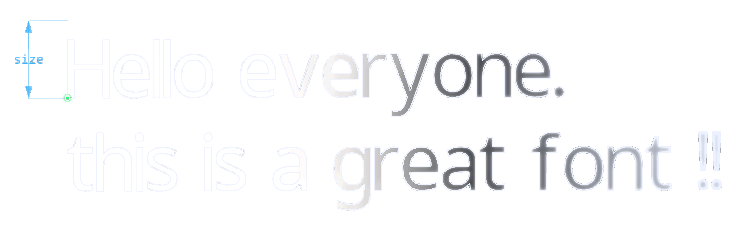
text mesh

The meshed font is cached so long texts are still fast to mesh

Parameters:

Name Type Description Default
text str

a multiline string to represent

required
font str

the string name of a font such as 'NotoMono-Bold' or the path to a .ttf font file

None
size float

the character size (metric unit)

1
spacing

spacing ratio between characters vec2(horizontal, vertical)

vec2(0.05, 0.2)
fill

if True, the characters are triangulated and the function returns a Mesh, else it returns its outline as a Web

True
align

text alignment, the tuple items can be:

  • 'left' or 'top'
  • 'center'
  • 'right' or 'bottom'
  • any float, as an offset on the position
(0, 0)
resolution

discretisation setting for the character primitives

None

Examples:

>>> part = text('Hello everyone.\nthis is a great font !!',
...             font='NotoSans-Regular',
...             align=('left', 0),
...             fill=True)
Source code in madcad/text/__init__.py
248
249
250
251
252
253
254
255
256
257
258
259
260
261
262
263
264
265
266
267
268
269
270
271
272
273
274
275
276
277
278
279
280
281
282
283
284
285
286
287
288
289
290
291
292
293
294
295
296
297
298
299
300
301
302
303
304
305
306
307
308
309
310
311
312
313
314
315
316
def text(text: str, font:str=None, size:float=1, spacing=vec2(0.05, 0.2), fill=True, align=(0,0), resolution=None):
	''' return a Mesh/Web containing the given text written using the given font

	![text mesh](../screenshots/text_mesh.png)

	The meshed font is cached so long texts are still fast to mesh

	Parameters:
		text:   a multiline string to represent
		font:   the string name of a font such as `'NotoMono-Bold'` or the path to a `.ttf` font file
		size:   the character size (metric unit)
		spacing:  spacing ratio between characters `vec2(horizontal, vertical)`
		fill:   if True, the characters are triangulated and the function returns a `Mesh`, else it returns its outline as a `Web`

		align:

			text alignment, the tuple items can be:

			- 'left' or 'top'
			- 'center'
			- 'right' or 'bottom'
			- any float, as an offset on the position

		resolution:  discretisation setting for the character primitives

	Examples:
		>>> part = text('Hello everyone.\\nthis is a great font !!',
		...             font='NotoSans-Regular',
		...             align=('left', 0),
		...             fill=True)

	'''
	if fill:
		pool = Mesh()
		character = character_surface
	else:
		pool = Web()
		character = character_outline

	face = freetype.Face(font_path(font or 'NotoMono-Regular'))
	position = vec3(0)
	for char in text:
		if char == ' ':
			position.x += 0.3
		elif char == '\t':
			width = 0.3
			position.x += int(position.x/width) * width
		elif char == '\n':
			position.y -= (1+spacing.y)
			position.x = 0
		else:
			cache = character(char, face, resolution)
			if fill:	part = cache['mesh']
			else:		part = cache['web']
			pool += part.transform(position-vec3(cache['cbox'].min.x,0,0))
			if cache['fixed']:
				position.x += 0.5 + spacing.x
			else:
				position.x += cache['cbox'].size.x + spacing.x

	if size != 1:
		pool = pool.transform(size)
	if align != (0,0):
		width = pool.box().size
		pool = pool.transform(vec3(
				processalign(align[0], -width[0]),
				processalign(align[1], -width[1]),
				0))
	return pool

TextDisplay(scene, position, text, size=None, color=None, font=None, align=(0, 0), layer=0)

Bases: Display

halo display of a monospaced text
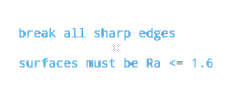
text display

This class is usually used through scheme.note_floating()

Source code in madcad/text/displays.py
 57
 58
 59
 60
 61
 62
 63
 64
 65
 66
 67
 68
 69
 70
 71
 72
 73
 74
 75
 76
 77
 78
 79
 80
 81
 82
 83
 84
 85
 86
 87
 88
 89
 90
 91
 92
 93
 94
 95
 96
 97
 98
 99
100
101
102
103
104
105
106
107
108
109
110
111
112
113
114
115
116
117
118
119
120
121
122
123
def __init__(self, scene, position, text, size=None, color=None, font=None, align=(0,0), layer=0):
	if not color:	color = settings.display['annotation_color']
	if not size:	size = settings.display['view_font_size']
	self.position = fvec3(position)
	self.color = fvec3(color)
	self.size = size
	self.layer = layer
	self.selected = False
	self.hovered = False

	# load font
	fontfile = font_path(font or 'NotoMono-Regular')
	def load(scene):
		img, align = create_font_texture(ImageFont.truetype(fontfile, 2*size))
		return scene.context.texture(img.size, 1, img.tobytes()), align
	self.fonttex, self.fontalign = scene.share(('fontfile', size), load)

	# load shader
	def load(scene):
		shader = scene.context.program(
					vertex_shader=open(resourcedir+'/shaders/font.vert').read(),
					fragment_shader=open(resourcedir+'/shaders/font.frag').read(),
					)
		shader['fonttex'].value = 0
		return shader
	self.shader = scene.share('shader_font', load)

	# place triangles
	points = np.zeros((len(self.pointsdef)*len(text), 4), 'f4')
	l = 0
	c = 0
	mc = 0
	for i,char in enumerate(text):
		if char == '\n':
			c = 0
			l += 1
		elif char == '\t':
			c += 4 - c%4	# TODO: use a tab size in settings
		elif char == ' ':
			c += 1
		else:
			n = ord(char)
			#placement = char_placement(2*size, *self.fontalign, n)
			for j,add in enumerate(self.pointsdef):
				points[len(self.pointsdef)*i + j] = [
					add[0]+c, 
					add[1]-l, 
					(n % self.fontalign[0] +add[0]) / self.fontalign[0], 
					(n //self.fontalign[0] -add[1]) / self.fontalign[1],
					]
			c += 1
		if c > mc:
			mc = c
	l += 1		
	align = (processalign(align[0], mc), -processalign(align[1], l))
	points -= [*align, 0, 0]
	self.textsize = (mc,l)
	self.visualsize = (-align[0], -align[1], mc//2-align[0], l-align[1])


	# create the buffers on the GPU
	self.vb_points = scene.context.buffer(points)
	self.vb_faces = scene.context.buffer(np.arange(points.shape[0], dtype='u4'))
	self.va = scene.context.vertex_array(
		self.shader,
		[(self.vb_points, '2f 2f', 'v_position', 'v_uv')],
		)

pointsdef = [[0, 0], [0, -1], [1, -1], [0, 0], [1, -1], [1, 0]] class-attribute instance-attribute

position = fvec3(position) instance-attribute

color = fvec3(color) instance-attribute

size = size instance-attribute

layer = layer instance-attribute

selected = False instance-attribute

hovered = False instance-attribute

shader = scene.share('shader_font', load) instance-attribute

textsize = (mc, l) instance-attribute

visualsize = (-align[0], -align[1], mc // 2 - align[0], l - align[1]) instance-attribute

vb_points = scene.context.buffer(points) instance-attribute

vb_faces = scene.context.buffer(np.arange(points.shape[0], dtype='u4')) instance-attribute

va = scene.context.vertex_array(self.shader, [(self.vb_points, '2f 2f', 'v_position', 'v_uv')]) instance-attribute

stack(view)

Source code in madcad/text/displays.py
125
126
def stack(self, view):
	return (self, 'screen', 2, self._render),