Skip to content

Generation

The functions here generare meshes from simpler objects (like lower dimension meshes, or simple primitives). You won't find here iterative methods, nor adaptative geometry operations, nor mesh modification operations. The functions here may eventually be complex but will always feel predictable and simple from a human perspective.

Based on extrusion/transformation of a Web

extrans(section, transformations, links=None)

Create a surface by extruding and transforming the given outline.
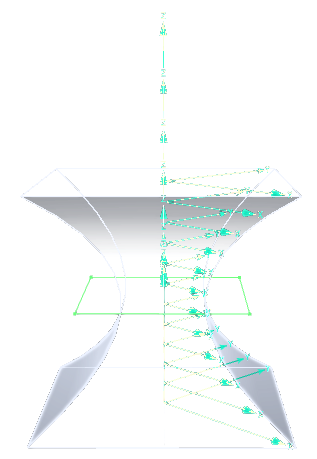
extrans result

Parameters:

Name Type Description Default
section

a Web or a Mesh

required
transformations iter

iterable of mat4, one each section

required
links

iterable of tuples (a,b,t) with (a,b) the sections to link (indices of values returned by transformation), t the group number of that link, to combine with the section groups.

If links is not specified, it will link each transformed section to the previous one. This is equivalent to giving links (i, i+1, 0)

None

Examples:

>>> extrans(
...     regon(Axis(O,Z), 1, 4), 
...     [translate(t*Z) * scale(vec3(0.5+t**2))  for t in linrange(-1, 1, div=10)],
...     )
Source code in madcad/generation.py
247
248
249
250
251
252
253
254
255
256
257
258
259
260
261
262
263
264
265
266
267
268
269
270
271
272
273
274
275
276
277
278
279
280
281
282
283
284
285
286
287
288
289
290
291
292
293
294
295
296
297
298
299
300
301
302
303
304
305
306
307
308
309
310
311
312
313
314
315
316
317
318
319
320
321
322
323
324
325
326
327
328
329
330
331
332
333
334
def extrans(section, transformations:iter, links=None) -> Mesh:
	''' Create a surface by extruding and transforming the given outline.

	![extrans result](../screenshots/generation-extrans.png)

	Parameters:
		section:           a `Web` or a `Mesh`
		transformations:   iterable of mat4, one each section
		links:             iterable of tuples (a,b,t)  with
			`(a,b)` the sections to link (indices of values returned by `transformation`),
			`t` the group number of that link, to combine with the section groups.

			If `links` is not specified, it will link each transformed section to the previous one.
			This is equivalent to giving links `(i, i+1, 0)`

	Examples:
		>>> extrans(
		... 	regon(Axis(O,Z), 1, 4), 
		... 	[translate(t*Z) * scale(vec3(0.5+t**2))  for t in linrange(-1, 1, div=10)],
		... 	)
	'''
	# prepare
	if isinstance(section, Mesh):
		face = copy(section)
		face.strippoints()
		section = face.outlines()
	else:
		face = None
		section = copy(web(section))
	reindex = section.strippoints()

	mesh = Mesh()	  # result mesh
	extremities = {}  # index of extremities in links graph (similar to Web extremities), associated to a boolean telling the direction of that extremity
	kept = {}         # transformations kept in memory, indexed by their sections
	groups = {}       # groups created by the extransion

	l = len(section.points)

	# generate all sections points using transformations
	k = 0
	for k,trans in enumerate(transformations):
		for p in section.points:
			mesh.points.append(vec3(trans*vec4(p,1)))
		if k and not links:
			al, bl, u = (k-1)*l, k*l, 0
			for (c,d),v in zip(section.edges, section.tracks):
				t = groups.setdefault((u,v), len(groups))
				mkquad(mesh, (al+c, al+d, bl+d, bl+c), t)
		# keep extremities transformations
		kept[k] = trans

	# generate all sections faces using links
	if links:
		for a,b,u in links:
			al = a*l
			bl = b*l
			for (c,d),v in zip(section.edges, section.tracks):
				t = groups.setdefault((u,v), len(groups))
				mkquad(mesh, (al+c, al+d, bl+d, bl+c), t)
			# find extremities
			if face:
				if a in extremities:   del extremities[a]
				else:	               extremities[a] = True
				if b in extremities:   del extremities[b]
				else:                  extremities[b] = False

	if not links:
		extremities[0] = True
		extremities[k] = False

	# generate all combined groups
	mesh.groups = [None] * len(groups)
	for (u,v), t in groups.items():
		mesh.groups[t] = section.groups[v]	# NOTE will change in the future to mention both u and v

	# append faces at extremities
	if face:
		merges = {}  # point merge dictionnary at faces insertion

		for k, orient in extremities.items():
			for src,dst in enumerate(reindex):
				if dst >= 0:
					merges[src + len(mesh.points)] = dst + l*k
			end = face .transform(kept[k])
			mesh += end if extremities[k] else end.flip()
		mesh.mergepoints(merges)

	return mesh

extrusion(shape, trans, alignment=0)

Create a surface by extruding the given outline by a transformation
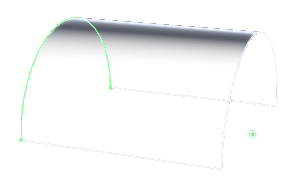
extrusion result

Parameters:

Name Type Description Default
shape

a line (Web or Wire) or a surface (Mesh) to extrude

required
trans

any transformation object accepted by mathutils.transform

required
alignment float

the relative position of the input shape in the resulting mesh - 0 means at the beginning - 1 means at the end

0

Examples:

>>> extrusion(ArcThrough(+Y, Z, -Y), 2*X)
Source code in madcad/generation.py
34
35
36
37
38
39
40
41
42
43
44
45
46
47
48
49
50
51
52
53
54
55
def extrusion(shape, trans, alignment:float=0) -> Mesh:
	''' Create a surface by extruding the given outline by a transformation

	![extrusion result](../screenshots/generation-extrusion.png)

	Parameters:
		shape:         a line (Web or Wire) or a surface (Mesh) to extrude
		trans:        any transformation object accepted by `mathutils.transform`
		alignment:  the relative position of the input shape in the resulting mesh
			- `0` means at the beginning
			- `1` means at the end

	Examples:
		>>> extrusion(ArcThrough(+Y, Z, -Y), 2*X)
	'''
	trans = transform(trans)
	neutral = mat4()
	return extrans(shape, [
				neutral + (trans-neutral)*(-alignment),
				neutral + (trans-neutral)*(1-alignment),
				],
				[(0,1,0)])

revolution(shape, axis=Axis(O, Z), angle=2 * pi, alignment=0, resolution=None)

Create a revolution surface by extruding the given outline steps is the number of steps between the start and the end of the extrusion
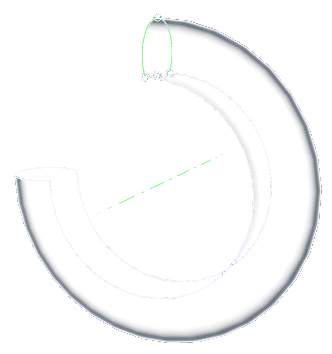
revolution result

Parameters:

Name Type Description Default
shape

the shape to extrude (Web, Wire, or Mesh), ideally a section

required
angle float

angle of rotation between the given profile and the final produced profile

2 * pi
axis

the axis to rotate around

Axis(O, Z)
alignment float

the relative position of the input shape in the resulting mesh

  • 0 means at the beginning
  • 1 means at the end
0
resolution

resolution setting for the biggest produced circle, such as for primitives

None

Examples:

>>> revolution(
...     ArcThrough(4*Z+Y, 6*Z, 4*Z-Y), 
...     Axis(O,Y), 
...     1.5*pi,
...     )
Source code in madcad/generation.py
57
58
59
60
61
62
63
64
65
66
67
68
69
70
71
72
73
74
75
76
77
78
79
80
81
82
83
84
85
86
87
88
89
90
91
92
93
94
95
def revolution(shape, axis=Axis(O,Z), angle:float=2*pi, alignment:float=0, resolution=None) -> Mesh:
	''' Create a revolution surface by extruding the given outline
	`steps` is the number of steps between the start and the end of the extrusion

	![revolution result](../screenshots/generation-revolution.png)

	Parameters:
		shape:    the shape to extrude (Web, Wire, or Mesh), ideally a section
		angle:    angle of rotation between the given profile and the final produced profile
		axis:     the axis to rotate around
		alignment:  the relative position of the input shape in the resulting mesh

			- `0` means at the beginning
			- `1` means at the end

		resolution:   resolution setting for the biggest produced circle, such as for primitives

	Examples:
		>>> revolution(
		... 	ArcThrough(4*Z+Y, 6*Z, 4*Z-Y), 
		... 	Axis(O,Y), 
		... 	1.5*pi,
		... 	)
	'''
	if not isinstance(shape, (Mesh,Web,Wire)):	
		shape = web(shape)
	# get the maximum radius, to compute the curve resolution
	radius = 0
	for pt in shape.points:
		radius = max(radius, length(noproject(pt-axis[0], axis[1])))
	div = settings.curve_resolution(abs(angle*radius), abs(angle), resolution)
	def links():
		for i in range(div):          yield (i,i+1, 0)
		if abs(angle-2*pi) <= NUMPREC:    yield (div, 0, 0)
		else:                             yield (div, div+1, 0)
	return extrans(shape, (
		rotatearound(t*angle, axis)
		for t in linrange(0-alignment, 1-alignment, div=div)
		), links())

helix(shape, height, angle, radius=1.0, axis=Axis(O, Z), alignment=0.0, resolution=None)

Extrude the given shape by rotating and translating along an axis
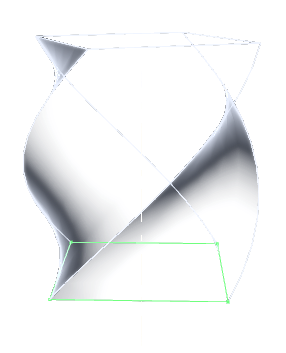
helix result

This variant expects the input shape to be close to orthogonal to the axis direction and is used to produce an screw/helix from its section

Parameters:

Name Type Description Default
shape

the shape to extrude (Web, Wire, or Mesh), ideally a section

required
height float

the maximum translation in the axis direction

required
radius float

the radius at which the hexlix angle is computed

1.0
angle float

the helix angle at radius

required
axis

the axis to rotate around and translate along

Axis(O, Z)
alignment float

the relative position of the input shape in the resulting mesh

  • 0 means at the beginning
  • 1 means at the end
0.0
resolution

resolution setting for subdivisions

None

Examples:

>>> helix(
...     regon(Axis(O,Z), 1, 4).subdivide(4), 
...     height=2, 
...     angle=radians(45),
...     )
Source code in madcad/generation.py
 97
 98
 99
100
101
102
103
104
105
106
107
108
109
110
111
112
113
114
115
116
117
118
119
120
121
122
123
124
125
126
127
128
129
def helix(shape, height:float, angle:float, radius:float=1., axis=Axis(O,Z), alignment:float=0., resolution=None) -> Mesh:
	''' Extrude the given shape by rotating and translating along an axis
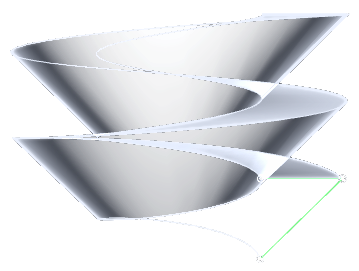
	![helix result](../screenshots/generation-helix.png)

	This variant expects the input shape to be close to orthogonal to the axis direction and is used to produce an screw/helix from its section

	Parameters:
		shape:    the shape to extrude (Web, Wire, or Mesh), ideally a section
		height:   the maximum translation in the `axis` direction
		radius:   the radius at which the hexlix `angle` is computed
		angle:    the helix angle at `radius`
		axis:     the axis to rotate around and translate along
		alignment:  the relative position of the input shape in the resulting mesh

			- `0` means at the beginning
			- `1` means at the end

		resolution:   resolution setting for subdivisions

	Examples:
		>>> helix(
		... 	regon(Axis(O,Z), 1, 4).subdivide(4), 
		... 	height=2, 
		... 	angle=radians(45),
		... 	)
	'''
	helix = tan(angle)
	div = settings.curve_resolution(height*helix, height/radius*helix, resolution)
	return extrans(shape, (
		translate(t*height*axis[1]) * rotatearound(t*height*helix/radius, axis)
		for t in linrange(0-alignment, 1-alignment, div=div)
		))

screw(shape, turns=1.0, axis=Axis(O, Z), step=None, alignment=0.0, resolution=None)

Extrude the given shape by rotating and translating along an axis

screw result

This variant expects the input shape to be close to coplanar to the axis direction and is used to produce a screw/helix from its profile

Parameters:

Name Type Description Default
shape

the shape to extrude (Web, Wire, or Mesh), ideally a profile

required
turns float

number of complete rotations of the profile

1.0
step float

the translation after a complete rotation, if not provided it is automatically adjusted to the profile's height

None
axis

the axis to rotate around and translate along

Axis(O, Z)
alignment float

the relative position of the input shape in the resulting mesh

  • 0 means at the beginning
  • 1 means at the end
0.0
resolution

resolution setting for subdivisions

None

Examples:

>>> screw(
...     wire([vec3(0,1,1), vec3(0,2,1), vec3(0,1,0)]).segmented(),
...     turns=2,
...     )
Source code in madcad/generation.py
131
132
133
134
135
136
137
138
139
140
141
142
143
144
145
146
147
148
149
150
151
152
153
154
155
156
157
158
159
160
161
162
163
164
165
166
167
168
169
170
171
172
173
174
175
176
def screw(shape, turns:float=1., axis=Axis(O,Z), step:float=None, alignment:float=0., resolution=None):
	''' Extrude the given shape by rotating and translating along an axis

	![screw result](../screenshots/generation-screw.png)

	This variant expects the input shape to be close to coplanar to the axis direction and is used to produce a screw/helix from its profile

	Parameters:
		shape:    the shape to extrude (Web, Wire, or Mesh), ideally a profile
		turns:    number of complete rotations of the profile
		step:     the translation after a complete rotation, if not provided it is automatically adjusted to the profile's height
		axis:     the axis to rotate around and translate along
		alignment:  the relative position of the input shape in the resulting mesh

			- `0` means at the beginning
			- `1` means at the end

		resolution:   resolution setting for subdivisions

	Examples:
		>>> screw(
		... 	wire([vec3(0,1,1), vec3(0,2,1), vec3(0,1,0)]).segmented(),
		... 	turns=2,
		... 	)
	'''
	if not isinstance(shape, (Mesh,Web,Wire)):	
		shape = web(shape)
	angle = turns * 2*pi
	# get the maximum radius, to compute the curve resolution
	# and the step if not provided
	radius = 0
	zmin, zmax = inf, -inf
	for pt in shape.points:
		z = dot(pt-axis[0], axis[1])
		v = noproject(pt-axis[0], axis[1])
		zmin = min(zmin, z)
		zmax = max(zmax, z)
		radius = max(radius, length(v))
	if step is None:
		step = zmax - zmin
	# produce the mesh
	div = settings.curve_resolution(abs(angle*radius), abs(angle), resolution)
	return extrans(shape, (
		translate(t*step*turns*axis[1]) * rotatearound(t*angle, axis)
		for t in linrange(0-alignment, 1-alignment, div=div)
		))

saddle(a, b)

Create a surface by extruding outine1 translating each instance to the next point of outline2
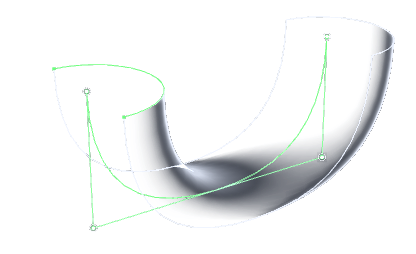
saddle result

Examples:

>>> saddle(
...     ArcThrough(+Y,X,-Y),
...     Softened([0*X, 0*X-2*Z, 4*X-2*Z, 4*X]),
...     )
Source code in madcad/generation.py
178
179
180
181
182
183
184
185
186
187
188
189
190
191
192
193
194
195
196
def saddle(a, b:Web) -> Mesh:
	''' Create a surface by extruding outine1 translating each instance to the next point of outline2

	![saddle result](../screenshots/generation-saddle.png)

	Examples:
		>>> saddle(
		... 	ArcThrough(+Y,X,-Y),
		... 	Softened([0*X, 0*X-2*Z, 4*X-2*Z, 4*X]),
		... 	)
	'''
	if not isinstance(a, (Mesh,Web,Wire)):
		a = web(a)
	b = web(b)
	def trans():
		s = b.points[0]
		for p in b.points:
			yield translate(mat4(1), p-s)
	return extrans(a, trans(), ((*e,t)  for e,t in zip(b.edges, b.tracks)))

tube(shape, path, end=True, section=True)

Create a tube surface by extruding the shape along the path if section is True, there is a correction of the segments to keep the section rigid by the curve
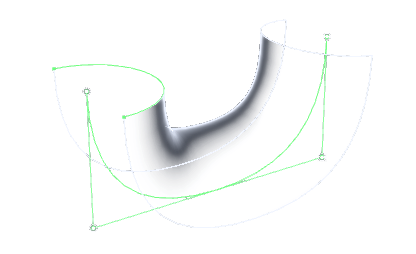
tube result

Examples:

>>> tube(
...     ArcThrough(+Y,X,-Y),
...     Softened([0*X, 0*X-2*Z, 4*X-2*Z, 4*X]),
...     )
Source code in madcad/generation.py
198
199
200
201
202
203
204
205
206
207
208
209
210
211
212
213
214
215
216
217
218
219
220
221
222
223
224
225
226
227
228
229
230
231
232
233
234
235
236
237
238
239
240
241
242
243
244
245
def tube(shape, path:Wire, end=True, section=True) -> Mesh:
	''' Create a tube surface by extruding the shape along the path if `section` is True, there is a correction of the segments to keep the section rigid by the curve

	![tube result](../screenshots/generation-tube.png)

	Examples:
		>>> tube(
		... 	ArcThrough(+Y,X,-Y),
		... 	Softened([0*X, 0*X-2*Z, 4*X-2*Z, 4*X]),
		... 	)
	'''
	path = wire(path)
	def trans():
		lastrot = quat()
		l = len(path)-1
		yield mat4(1)
		for i in range(1,l+1):

			if i < l:
				# calculer l'angle a ce coude
				o = path[i]
				v1 = normalize(path[i-1]-o)
				v2 = normalize(path[i+1]-o)
				c = cross(-v1,v2)
				o = dot(-v1,v2)
				cl = length(c)
				cn = c/cl
				ha = atan2(cl,o)/2
				hrot = angleAxis(ha, cn)
				# calcul de la rotation de la section
				rot = hrot * lastrot
				lastrot = hrot * rot
				m = mat3_cast(rot)
				# deformation de la section pour ne pas réduire le volume
				if section:	
					m = scaledir(normalize(v1+v2), 1/cos(ha)) * m
			else:
				m = mat3_cast(lastrot)
			# construction de la transformation
			yield transform(path[i]) * mat4(m) * transform(-path[0])

	trans = trans()
	if not end:		next(trans)
	# handle wires with no tracks
	if path.tracks:		links = ((i, i+1, path.tracks[i]) for i in range(len(path)-1))
	else:				links = ((i, i+1, 0) for i in range(len(path)-1))
	# generate
	return extrans(shape, trans, links)

Generation of common meshes

regon(axis, radius, n, alignment=vec3(1, 0, 0))

Create a regular n-gon Wire, the same way we create a Circle
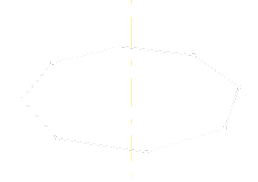
regon result

Source code in madcad/generation.py
676
677
678
679
680
681
682
683
684
685
def regon(axis:primitives.Axis, radius, n, alignment=vec3(1,0,0)) -> 'Wire':
	''' Create a regular n-gon `Wire`, the same way we create a `Circle`

	![regon result](../screenshots/generation-regon.png)
	'''
	x,y,z = dirbase(axis[1], alignment)
	return wire(typedlist(
		axis[0] + radius*(cos(2*pi*i/n)*x + sin(2*pi*i/n)*y)  
		for i in range(n)
		)).close().segmented()

square(axis, width)

Return a simple square with the given normal axis and square width.
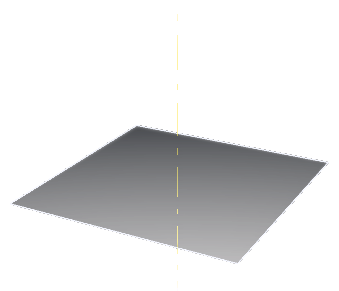
square result

Useful to quickly create a cutplane

Source code in madcad/generation.py
599
600
601
602
603
604
605
606
607
608
609
610
611
def square(axis:primitives.Axis, width:float) -> 'Mesh':
	''' Return a simple square with the given normal axis and square width.

	![square result](../screenshots/generation-square.png)

	Useful to quickly create a cutplane
	'''
	x,y,z = dirbase(axis[1])
	return Mesh(
		typedlist([axis[0]+width*p   for p in ((x+y), (y-x), (-y-x), (-y+x))]),
		typedlist([uvec3(0,1,2), uvec3(2,3,0)]),
		groups=[None],
		)

brick(*args, **kwargs)

A simple brick with rectangular axis-aligned sides
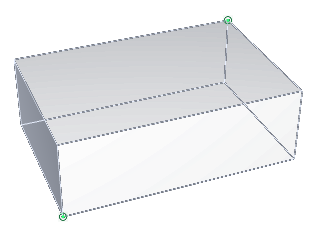
brick result

It can be constructed in the following ways:

  • brick(Box)
  • brick(min, max)
  • brick(center=vec3(0), size=vec3(-inf), alignment=0.5)

Parameters:

Name Type Description Default
min

the corner with minimal coordinates

required
max

the corner with maximal coordinates

required
center

the center of the box

required
size

the all positive diagonal of the box

required
alignment

where the center is inside the box

required
Source code in madcad/generation.py
417
418
419
420
421
422
423
424
425
426
427
428
429
430
431
432
433
434
435
436
437
438
439
440
441
442
443
444
445
446
447
448
449
450
451
452
453
454
455
456
457
458
459
460
461
462
463
464
465
466
467
def brick(*args, **kwargs) -> 'Mesh':
	''' A simple brick with rectangular axis-aligned sides

	![brick result](../screenshots/generation-brick.png)

	It can be constructed in the following ways:

	- `brick(Box)`
	- `brick(min, max)`
	- `brick(center=vec3(0), size=vec3(-inf), alignment=0.5)`

	Parameters:
		min:	the corner with minimal coordinates
		max:	the corner with maximal coordinates
		center: the center of the box
		size:  the all positive diagonal of the box
		alignment: where the center is inside the box
	'''
	if len(args) == 1 and not kwargs and isinstance(args[0], Box):		
		box = args[0]
	else:							
		box = Box(*args, **kwargs)
	mesh = Mesh(
		[
			vec3(1, 0, 0),
			vec3(1, 0, 1),
			vec3(0, 0, 1),
			vec3(0, 0, 0),
			vec3(1, 1, 0),
			vec3(1, 1, 1),
			vec3(0, 1, 1),
			vec3(0, 1, 0)],
		[
			uvec3(0, 1, 2),
			uvec3(0, 2, 3),
			uvec3(4, 7, 6),
			uvec3(4, 6, 5),
			uvec3(0, 4, 5),
			uvec3(0, 5, 1),
			uvec3(1, 5, 6),
			uvec3(1, 6, 2),
			uvec3(2, 6, 7),
			uvec3(2, 7, 3),
			uvec3(4, 0, 3),
			uvec3(4, 3, 7)],
		[	0, 0, 1, 1, 2, 2, 3, 3, 4, 4, 5, 5	],
		[None] * 6,
		)
	for i in range(len(mesh.points)):
		mesh.points[i] = mesh.points[i]*box.size + box.min
	return mesh

parallelogram(*directions, origin=vec3(0), alignment=vec3(0), fill=True)

Create a parallelogram or parallelepiped depending on the number of directions given
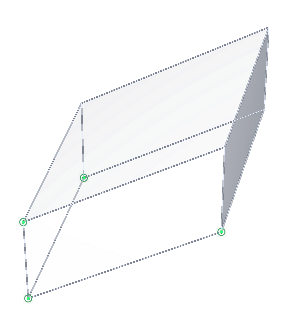
parallelogram result

Parameters:

    directions:     list of 1-3 directions, they must for a right handed base for the face normals to be oriented outward
    origin: origin the resulting shape, the shape will placed relatively to that point
    alignment: relative position of the origin in the shape: 0 means at start of each direction, 1 means at the tip of each direction
    fill: 
            - if True, a mesh will be generated (forming a surface with 2 directions, or an envelope with 3 directions)
            - if False, a Web will be generated
Source code in madcad/generation.py
469
470
471
472
473
474
475
476
477
478
479
480
481
482
483
484
485
486
487
488
489
490
491
492
493
494
495
496
497
498
499
500
501
502
503
504
505
506
507
508
509
510
511
512
513
514
515
516
517
518
519
520
521
522
523
524
525
526
527
528
529
530
531
532
533
534
535
536
537
538
539
def parallelogram(*directions, origin=vec3(0), alignment=vec3(0), fill=True) -> 'Mesh':
	''' Create a parallelogram or parallelepiped depending on the number of directions given

	![parallelogram result](../screenshots/generation-parallelogram.png)

	Parameters:

		directions:	list of 1-3 directions, they must for a right handed base for the face normals to be oriented outward
		origin: origin the resulting shape, the shape will placed relatively to that point
		alignment: relative position of the origin in the shape: 0 means at start of each direction, 1 means at the tip of each direction
		fill: 
			- if True, a mesh will be generated (forming a surface with 2 directions, or an envelope with 3 directions)
			- if False, a Web will be generated
	'''
	try:				alignment = iter(alignment)
	except TypeError:	alignment = itertools.repeat(alignment)

	# generate points by binary combinations
	points = []
	min = origin - sum(a*d  for a,d in zip(alignment, directions))
	for i in range(2**len(directions)):
		points.append(min + sum(d if i>>k & 1 else 0   for k,d in enumerate(directions)))

	# mesh
	if len(directions) == 1:
		if fill:
			raise ValueError('cannot fill parallelogram with one only direction')
		else:
			return Web(points, [uvec2(0,1)])

	if len(directions) == 2:
		if fill:
			return Mesh(points, [
					uvec3(0,1,2), uvec3(2,1,3),
					])
		else:
			return Web(points, [
					uvec2(0,1),
					uvec2(1,3),
					uvec2(3,2),
					uvec2(2,0),
					]).segmented()

	elif len(directions) == 3:
		if fill:
			return Mesh(points, 
					[
						uvec3(0,2,1), uvec3(1,2,3),
						uvec3(0,1,4), uvec3(1,5,4),
						uvec3(0,4,2), uvec3(2,4,6),
						uvec3(4,5,6), uvec3(5,7,6),
						uvec3(2,6,3), uvec3(3,6,7),
						uvec3(1,3,5), uvec3(3,7,5),
					],
					[
						0, 0,
						1, 1,
						2, 2,
						3, 3,
						4, 4,
						5, 5,
					])
		else:
			return Web(points, [
					uvec2(0,1), uvec2(2,3), uvec2(4,5), uvec2(6,7),
					uvec2(0,2), uvec2(1,3), uvec2(4,6), uvec2(5,7),
					uvec2(0,4), uvec2(1,5), uvec2(2,6), uvec2(3,7),
					]).segmented()

	else:
		raise ValueError('wrong number of directions')

cylinder(bottom, top, radius, fill=True, resolution=None)

Create a revolution cylinder, with the given radius
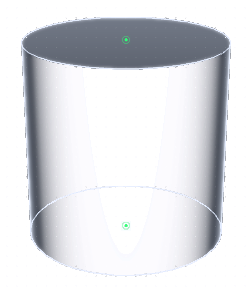
cylinder result

Parameters:

    bottom, top (vec3): the cylinder extremities centers
    fill (bool):        whether to put faces at both extremities
Source code in madcad/generation.py
541
542
543
544
545
546
547
548
549
550
551
552
553
554
def cylinder(bottom:vec3, top:vec3, radius:float, fill=True, resolution=None) -> 'Mesh':
	''' Create a revolution cylinder, with the given radius

	![cylinder result](../screenshots/generation-cylinder.png)

	Parameters:

		bottom, top (vec3): the cylinder extremities centers
		fill (bool):        whether to put faces at both extremities
	'''
	direction = top-bottom
	base = wire(primitives.Circle(Axis(bottom,normalize(direction)), radius), resolution=resolution)
	if fill:	base = _fill(base).flip()
	return extrusion(base, direction)

cone(summit, base, radius, fill=True, resolution=None)

Create a revolution cone, with a base of the given radius
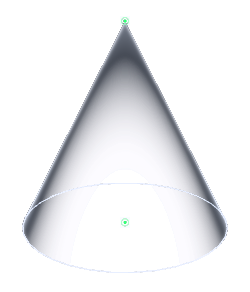
cone result

Parameters:

    summit (vec3):  The point at the top of the cone
    base (vec3):    the center point of the base
    fill (bool):    whether to put a face at the base
Source code in madcad/generation.py
556
557
558
559
560
561
562
563
564
565
566
567
568
569
def cone(summit:vec3, base:vec3, radius:float, fill=True, resolution=None) -> 'Mesh':
	''' Create a revolution cone, with a base of the given radius

	![cone result](../screenshots/generation-cone.png)

	Parameters:

		summit (vec3):  The point at the top of the cone
		base (vec3):    the center point of the base
		fill (bool):    whether to put a face at the base
	'''
	base = wire(primitives.Circle(Axis(base, normalize(summit-base)), radius), resolution=resolution)
	if fill:	base = _fill(base)
	return pyramid(summit, base)

pyramid(summit, base)

Create a pyramid with the given summit point and the given base
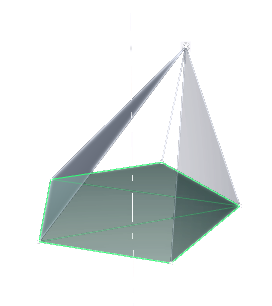
pyramid result

Parameters:

Name Type Description Default
summit vec3

the top (summit) of the cone, not necessarity in the center of the shape

required
base

(Mesh,Web,Wire): the base shape

required
Source code in madcad/generation.py
571
572
573
574
575
576
577
578
579
580
581
582
583
584
585
586
587
588
589
590
591
592
593
594
595
596
597
def pyramid(summit:vec3, base) -> 'Mesh':
	''' Create a pyramid with the given summit point and the given base

	![pyramid result](../screenshots/generation-pyramid.png)

	Parameters:
		summit (vec3):   the top (summit) of the cone, not necessarity in the center of the shape
		base: (Mesh,Web,Wire):  the base shape
	'''
	if isinstance(base, Mesh):
		outline = base.outlines().flip()
		outline.stripgroups()
		result = Mesh(base.points, groups=outline.groups)
	else:
		outline = web(base)
		result = Mesh(points=outline.points, groups=outline.groups)

	p = len(result.points)
	result.points.append(summit)
	for edge, track in zip(outline.edges, outline.tracks):
		result.faces.append(uvec3(edge, p))
		result.tracks.append(track)

	if isinstance(base, Mesh):
		result += base.flip()

	return result

icosahedron(center, radius)

A simple icosahedron (see https://en.wikipedia.org/wiki/Icosahedron)
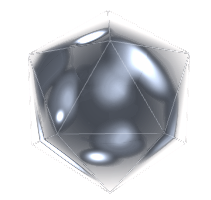
icosahedron result

Source code in madcad/generation.py
613
614
615
616
617
618
619
620
621
622
623
624
625
626
627
628
629
630
631
632
633
634
635
636
637
638
639
640
641
642
643
644
def icosahedron(center:vec3, radius:float) -> 'Mesh':
	''' A simple icosahedron (see https://en.wikipedia.org/wiki/Icosahedron)

	![icosahedron result](../screenshots/generation-icosahedron.png)
	'''
	phi = (1+ sqrt(5)) /2	# golden ratio
	m = Mesh(
		typedlist([
			vec3(0, 1, phi),
			vec3(1, phi, 0),
			vec3(phi, 0, 1),
			vec3(0, -1, phi),
			vec3(-1, phi, 0),
			vec3(phi, 0, -1),
			vec3(0, 1, -phi),
			vec3(1, -phi, 0),
			vec3(-phi, 0, 1),
			vec3(0, -1, -phi),
			vec3(-1, -phi, 0),
			vec3(-phi, 0, -1),
		]),
		typedlist([
			uvec3(0,1,4), uvec3(0,2,1), uvec3(0,3,2), uvec3(0,8,3), uvec3(0,4,8),
			uvec3(2,5,1), uvec3(1,6,4), uvec3(4,11,8), uvec3(8,10,3), uvec3(3,7,2),
			uvec3(3,10,7), uvec3(2,7,5), uvec3(1,5,6), uvec3(4,6,11), uvec3(8,11,10),
			uvec3(7,9,5), uvec3(5,9,6), uvec3(6,9,11), uvec3(11,9,10), uvec3(10,9,7),
		]),
		)
	f = radius/length(m.points[0])
	for i,p in enumerate(m.points):
		m.points[i] = f*p + center
	return m

icosphere(center, radius, resolution=None)

A simple icosphere with an arbitrary resolution (see https://en.wikipedia.org/wiki/Geodesic_polyhedron).
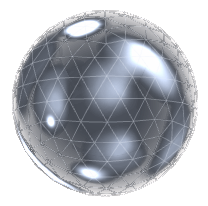
icosphere result

Points are obtained from a subdivided icosahedron and reprojected on the desired radius.

Source code in madcad/generation.py
646
647
648
649
650
651
652
653
654
655
656
657
def icosphere(center:vec3, radius:float, resolution=None) -> 'Mesh':
	''' A simple icosphere with an arbitrary resolution (see https://en.wikipedia.org/wiki/Geodesic_polyhedron).

	![icosphere result](../screenshots/generation-icosphere.png)

	Points are obtained from a subdivided icosahedron and reprojected on the desired radius.
	'''
	div = settings.curve_resolution(2/6*pi*radius, 2/6*pi, resolution)
	ico = icosahedron(center, radius).subdivide(div-1)
	for i,p in enumerate(ico.points):
		ico.points[i] = center + radius * normalize(p-center)
	return ico

uvsphere(center, radius, alignment=vec3(0, 0, 1), resolution=None)

A simple uvsphere (simple sphere obtained with a revolution of an arc)
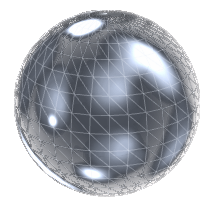
uvsphere result

Source code in madcad/generation.py
659
660
661
662
663
664
665
666
667
668
669
670
671
672
673
674
def uvsphere(center:vec3, radius:float, alignment=vec3(0,0,1), resolution=None) -> 'Mesh':
	''' A simple uvsphere (simple sphere obtained with a revolution of an arc)

	![uvsphere result](../screenshots/generation-uvsphere.png)
	'''
	x,y,z = dirbase(alignment)
	mesh = revolution(
			web(primitives.ArcCentered(
				(center,x), 
				center+radius*z, 
				center-radius*z, 
				resolution=resolution)),
			Axis(center, z),
			resolution=resolution)
	mesh.mergeclose()
	return mesh

Repeating

repeat(pattern, repetitions, transform)

Create a mesh duplicating n times the given pattern, each time applying the given transform.

Parameters:

Name Type Description Default
pattern

can either be a Mesh, Web or Wire, the return type will depend on the input type

required
repetitions int

the number of repetitions

required
transform

is the transformation between each duplicate

required
Source code in madcad/generation.py
687
688
689
690
691
692
693
694
695
696
697
698
699
700
701
def repeat(pattern, repetitions:int, transform):
	''' Create a mesh duplicating n times the given pattern, each time applying the given transform.

	Parameters:
		pattern:   can either be a `Mesh`, `Web` or `Wire`, the return type will depend on the input type
		repetitions:   the number of repetitions
		transform:     is the transformation between each duplicate
	'''
	current = pattern
	pool = type(pattern)(groups=pattern.groups)
	if repetitions:	pool += current
	for i in range(1, repetitions):
		current = current.transform(transform)
		pool += current
	return pool

repeataround(pattern, repetitions=None, axis=Axis(O, Z), angle=2 * pi)

same as [repeat] using [rotatearound]

Source code in madcad/generation.py
703
704
705
706
707
708
709
710
711
712
713
714
715
716
717
def repeataround(pattern, repetitions:int=None, axis=Axis(O,Z), angle=2*pi):
	''' same as [repeat] using [rotatearound] '''
	if repetitions is None:
		if isinstance(pattern, Mesh):	indices = (i for f in pattern.faces for i in f )
		elif isinstance(pattern, Web):	indices = (i for e in pattern.edges for i in e)
		elif isinstance(pattern, Wire): indices = iter(pattern.indices)

		x,y,z = dirbase(axis[1], align=pattern.points[next(indices)] - axis[0])
		lower, upper = 0, 0
		for p in indices:
			t = atan2(dot(pattern.points[p]-axis[0], y), dot(pattern.points[p]-axis[0], x))
			lower = min(lower, t)
			upper = max(upper, t)
		repetitions = round(angle / (upper - lower))
	return repeat(pattern, repetitions, rotatearound(angle/repetitions, axis))

Others

fill(outline, normal=None)

Generates a surface for a flat outline using the prefered triangulation method.
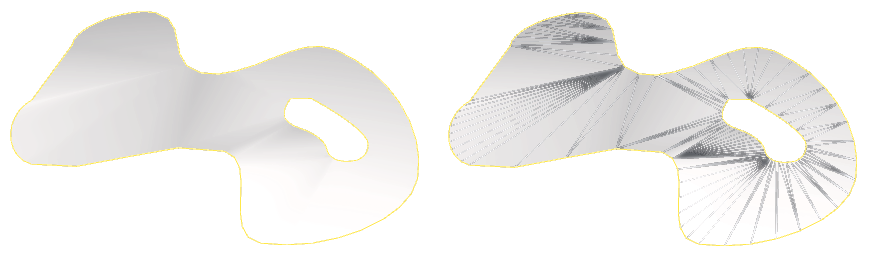
fill result

If normal is specified, it must be the normal vector to the plane, and will be used to orient the face.

Source code in madcad/generation.py
340
341
342
343
344
345
346
347
348
349
350
351
352
353
def fill(outline, normal=None) -> 'Mesh':
	''' Generates a surface for a flat outline using the prefered triangulation method.

	![fill result](../screenshots/generation-fill.png)

	If `normal` is specified, it must be the normal vector to the plane, and will be used to orient the face.
	'''
	if isinstance(outline, Wire):
		m = triangulation.triangulation_outline(outline, normal)
	else:
		m = triangulation.triangulation(web(outline), normal)
	if normal and dot(m.facenormal(0), normal) < 0:
		m = m.flip()
	return m

icosurface(pts, ptangents, resolution=None)

Generate a surface ICO (a subdivided triangle) with its points interpolated using interpol2tri.

  • If normals are given instead of point tangents (for ptangents), the surface will fit a sphere.
  • Else ptangents must be a list of couples (2 edge tangents each point).
Source code in madcad/generation.py
356
357
358
359
360
361
362
363
364
365
366
367
368
369
370
371
372
373
374
375
376
377
378
379
380
381
382
383
384
def icosurface(pts, ptangents, resolution=None) -> 'Mesh':
	''' Generate a surface ICO (a subdivided triangle) with its points interpolated using interpol2tri.

	- If normals are given instead of point tangents (for ptangents), the surface will fit a sphere.
	- Else `ptangents` must be a list of couples (2 edge tangents each point).
	'''
	# compute normals to points
	if isinstance(ptangents[0], tuple):
		normals = [None]*3
		for i in range(3):
			normals[i] = normalize(cross(ptangents[i][0], ptangents[i][1]))
	else:
		# if normals are given instead of tangents, compute tangents to fit a sphere surface
		normals = ptangents
		ptangents = [None]*3
		for i in range(3):
			ptangents[i] = (
				normalize(noproject(pts[i-2]-pts[i], normals[i])) * arclength(pts[i], pts[i-2], normals[i], normals[i-2]),
				normalize(noproject(pts[i-1]-pts[i], normals[i])) * arclength(pts[i], pts[i-1], normals[i], normals[i-1]),
				)

	# evaluate resolution (using a bad approximation of the length for now)
	div = max(( settings.curve_resolution(
					distance(pts[i-1], pts[i-2]), 
					anglebt(normals[i-1], normals[i-2]), 
					resolution)
				for i in range(3) ))

	return dividedtriangle(lambda u,v: intri_sphere(pts, ptangents, u,v), div)