Skip to content

blending -- Creation of surface between outlines

This module focuses on automated envelope generations, based on interface outlines.

The user has only to define the interface outlines or surfaces to join, and the algorithm makes the surface. No more pain to imagine some fancy geometries.

Formal definitions

  • interface: a surface or an outline (a loop) with associated exterior normals.
  • node: a group of interfaces meant to be attached together by a blended surface.

In order to generate envelopes, this module asks for cutting all the surfaces to join into 'nodes'. The algorithm decides how to join shortly all the outlines in a node. Once splited in nodes, you only need to generate node junctions for each, and concatenate the resulting meshes.

Details

The blended surfaces are created between interfaces, linked as the points of a convex polyedron of the interfaces directions to the node center.

Example

    >>> x, y, z = vec3(1, 0, 0), vec3(0, 1, 0), vec3(0, 0, 1)

    >>> # 1. A surface can be passed: the surface outlines and
    >>> # normals will be used as the generated surface tangents
    >>> # 2. Wire or primitives can be passed: the wire loops are used
    >>> # and the approximate normal to the  wire plane
    >>> # 3. More parameters when building directly the interface
    >>> m = junction(
    ...             extrusion(2 * z, web(Circle((vec3(0), z), 1))), # 1.
    ...             Circle((2 * x, x), 0.5),                        # 2.
    ...             (Circle((2 * y, y), 0.5), "tangent", 2.0),      # 3.
    ...             generate="normal",
    ... )

To come in a next version

    >>> # create junction for each iterable of interface,
    >>> # if some are not interfaces, they are used
    >>> # as placeholder objects for auto-determined interfaces
    >>> multijunction(
    ...             (surf1, surf2, 42, surf5),
    ...             (42, surf3, surf4),
    ...             generate='straight',
    ... )

General mesh generation

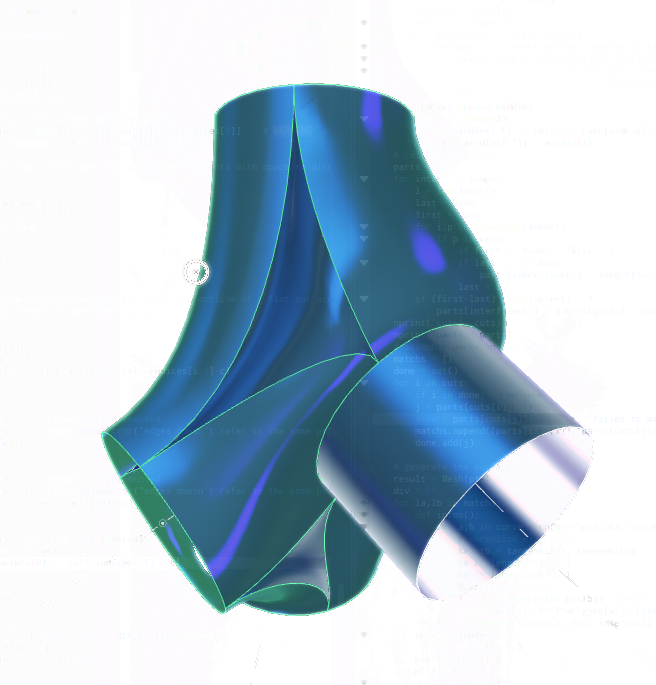
junction(*args, center=None, tangents='normal', weight=1.0, match='length', resolution=None)

Join several outlines with a blended surface
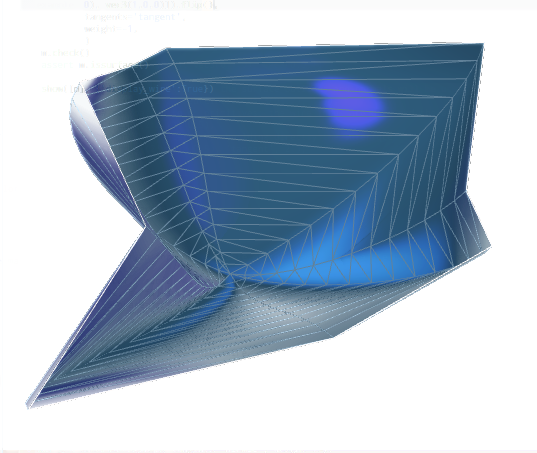
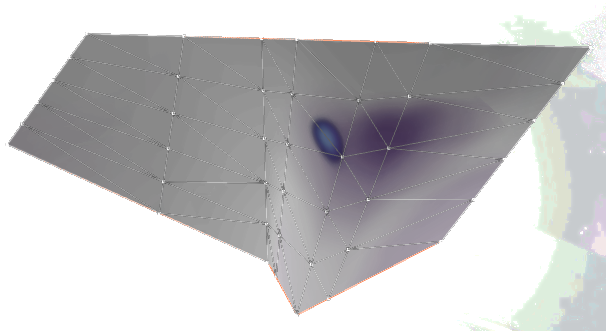
junction preparation junction result

    tangents:       
            'straight'      no interpolation, straight lines
            'normal'        interpolated surface starts normal to the interfaces
            'tangent'       interpolated surface starts tangent to the interfaces

    weight:
            factor applied on the tangents before passing to `interpol2` or `intri_smooth`
            the resulting tangent is computed in point `a` as `weight * distance(a,b) * normalize(tangent[a])`

    match:
            'length'        share the outline between 2 matched points to assign the same length to both sides
            'corner'        split the curve to share around a corner

    center:         
            position of the center of the junction node used to determine connexion between interfaces
            can be usefull for particularly weird and ambiguous interfaces
Note

match method 'corner' is not yet implemented

Source code in madcad/blending.py
152
153
154
155
156
157
158
159
160
161
162
163
164
165
166
167
168
169
170
171
172
173
174
175
176
177
178
179
180
181
182
183
184
185
186
187
188
189
190
191
192
193
194
195
196
197
198
199
200
201
202
203
204
205
206
207
208
209
210
211
212
213
214
215
216
217
218
219
220
221
222
223
224
225
226
227
228
229
230
231
232
233
234
235
236
237
238
239
240
241
242
243
244
245
246
247
248
249
250
251
252
253
254
255
256
257
258
259
260
261
262
263
264
265
266
267
268
269
270
271
272
273
274
275
276
277
278
279
280
281
282
283
def junction(*args, center=None, tangents='normal', weight=1., match='length', resolution=None):
	''' Join several outlines with a blended surface
	![junction preparation](../screenshots/junction-circles-prep.png)
	![junction result](../screenshots/junction-circles.png)

		tangents:	
			'straight'	no interpolation, straight lines
			'normal'	interpolated surface starts normal to the interfaces
			'tangent'	interpolated surface starts tangent to the interfaces

		weight:
			factor applied on the tangents before passing to `interpol2` or `intri_smooth`
			the resulting tangent is computed in point `a` as `weight * distance(a,b) * normalize(tangent[a])`

		match:
			'length'	share the outline between 2 matched points to assign the same length to both sides
			'corner'	split the curve to share around a corner

		center:		
			position of the center of the junction node used to determine connexion between interfaces
			can be usefull for particularly weird and ambiguous interfaces

	Note:
		match method 'corner' is not yet implemented
	'''
	pts, tangents, weights, loops = get_interfaces(args, tangents, weight)
	if len(loops) == 0:
		return Mesh()
	if len(loops) == 1:	
		return blendloop(
					(pts, tangents, weights, loops), 
					center, resolution=resolution)
	if len(loops) == 2:
		c0 = interfaces_center(pts, loops[0])
		c1 = interfaces_center(pts, loops[1])
		z = c1 - c0
		p = pts[imax( length2(noproject(pts[i]-c0, z))   for i in loops[0] )]
		x = noproject(p - c0, z)
		i0 = imax( dot(pts[i], x)  for i in loops[0])
		i1 = imax( dot(pts[i], x)  for i in loops[1])
		return blendpair(
					(pts, tangents, weights, (
						loops[0][i0:]+loops[0][1:i0+1],
						loops[1][i1:]+loops[1][1:i1+1],
						)),
					resolution=resolution)

	# determine center and convex hull of centers
	if not center:
		center = interfaces_center(pts, *loops)
	node = convexhull([	normalize(interfaces_center(pts, interf)-center) 
						for interf in loops])
	# fix convexhull faces orientations
	for i,f in enumerate(node.faces):
		if dot(node.facenormal(f), sum(node.facepoints(i))) < -1e-9:
			node.faces[i] = (f[0],f[2],f[1])
	nodeconn = connef(node.faces)

	# determine the junction triangles and cuts
	middles = []
	cuts = {}
	for face in node.faces:
		n = node.facenormal(face)
		middle = [	max(loops[i], key=lambda p: dot(pts[p], n) )	
					for i in face]
		#middle = [None]*3
		#for i in range(3):
			#interface = loops[face[i]]
			#middle[i] = interface[max(range(len(interface)), 
				#key=lambda j: dot(pts[interface[i]], n) * dot(n, 
									#cross(	pts[interface[j]] - pts[interface[j-1]], 
											#node.points[face[i]] - node.points[face[i-1]])),
				#)]
		middles.append(middle)
		for i in range(3):
			if middle[i-1] in cuts and cuts[middle[i-1]] != middle[i-2]:	continue
			cuts[middle[i-1]] = middle[i]
	# cut the interfaces
	parts = {}
	for interf in loops:
		l = len(interf)
		last = None
		first = None
		for i,p in enumerate(interf):
			if p in cuts:
				if first is None:	first = i
				if last is not None:
					parts[interf[last]] = interf[last:i+1]
				last = i
		if (first-last) % len(interf) > 1:
			parts[interf[last]] = interf[last:] + interf[1:first+1]

	# assemble parts in matchings
	matchs = []
	done = set()
	for i in cuts:
		if i in done:	continue
		j = parts[cuts[i]][-1]
		assert parts[cuts[j]][-1] == i, "failed to match outlines"
		matchs.append((parts[cuts[i]], parts[cuts[j]]))
		done.add(j)

	# generate the surfaces
	result = Mesh(pts)
	div = 11
	for la,lb in matchs:
		def infos():
			for a,b in match_length(Wire(pts,lb), Wire(pts,list(reversed(la)))):
				# normalize except for 0
				ta, tb = tangents[a], tangents[b]
				ta /= length(ta) or 1
				tb /= length(tb) or 1
				# scale and weight
				l = distance(pts[a],pts[b])  # NOTE not the arclength for the moment
				yield (pts[a], ta*l*weights[a]), (pts[b], tb*l*weights[b])
		result += blenditer(infos(), div, interpol2)
	for tri in middles:
		assert len(tri) == 3
		ptgts = [None]*3
		ptri = [None]*3
		for i in range(3):
			s = tri[i]
			ptgts[i] = (tangents[s]*weights[s]*distance(pts[s], pts[tri[i-2]]), 
						tangents[s]*weights[s]*distance(pts[s], pts[tri[i-1]]),
						)
			ptri[i] = pts[tri[i]]

		result += generation.dividedtriangle(lambda u,v: intri_smooth(ptri, ptgts, u,v), div)

	result.mergeclose()
	return result

blendloop(interface, center=None, tangents='tangent', weight=1.0, resolution=None)

Blend inside a loop interface

blendloop result

    see `junction` for the parameters.
Source code in madcad/blending.py
387
388
389
390
391
392
393
394
395
396
397
398
399
400
401
402
403
404
405
406
407
408
409
410
411
412
def blendloop(interface, center=None, tangents='tangent', weight=1., resolution=None) -> Mesh:
	''' Blend inside a loop interface

	![blendloop result](../screenshots/blendloop.png)

		see `junction` for the parameters.
	'''
	pts, tangents, weights, loops = get_interfaces([interface], tangents, weight)
	if len(loops) > 1:	
		raise ValueError('interface must have one loop only')
	loop = loops[0]

	# get center and normal at center
	if not center:
		center = interfaces_center(pts, *loops) + sum(weights[p]*tangents[p] for p in loop) / len(loop)
	normal = normalize(sum(normalize(center-pts[p])	for p in loop))
	if not isfinite(normal):	normal = vec3(0)

	# generatestraight
	match = [None] * len(loop)
	div = 0
	for i,p in enumerate(loop):
		match[i] = m = (	(pts[p], distance(center, pts[p])*weights[p]*tangents[p]), 
							(center, noproject(pts[p]-center, normal))	)
		div = max(div, settings.curve_resolution(distance(m[0][0],m[1][0]), anglebt(m[0][1],m[1][1]), resolution))
	return blenditer(match, div, interpol2)

blendpair(*interfaces, match='length', tangents='tangent', weight=1.0, resolution=None)

Blend between a pair of interfaces

blendpair result

    match:   
            `'length'`, `'closest'` refer to `match_*` in this module

    see `junction` for the other parameters.
Source code in madcad/blending.py
415
416
417
418
419
420
421
422
423
424
425
426
427
428
429
430
431
432
433
434
435
436
437
438
439
440
441
442
443
444
445
446
447
448
449
450
451
452
453
454
455
456
457
458
459
460
461
462
463
def blendpair(*interfaces, match='length', tangents='tangent', weight=1., resolution=None) -> Mesh:
	''' Blend between a pair of interfaces

	![blendpair result](../screenshots/blendpair.png)

		match:   
			`'length'`, `'closest'` refer to `match_*` in this module 

		see `junction` for the other parameters.
	'''
	pts, tangents, weights, loops = get_interfaces(interfaces, tangents, weight)
	if len(loops) != 2:	
		raise ValueError('interface must have exactly 2 loops, got '+str(len(loops)))

	if match == 'length':		method = match_length
	elif match == 'closest':	method = match_closest
	else:
		raise ValueError('matching method {} not implemented'.format(match))

	#if loops[1][0] == loops[1][-1]:		loops[1] = synchronize(Wire(pts, loops[0]), Wire(pts, loops[1])).indices
	#elif loops[0][0] == loops[0][-1]:	loops[0] = synchronize(Wire(pts, loops[1]), Wire(pts, loops[0])).indices

	match = list(method(Wire(pts, loops[0]), Wire(pts, list(reversed(loops[1])))))
	# get the discretisation
	div = 0
	for i in range(1, len(match)):
		a,d = match[i-1][0], match[i-1][1]
		b,c = match[i][0], match[i][1]
		m = (pts[a] + pts[b] + pts[c] + pts[d]) /4
		ta = pts[a] -m
		tb = pts[b] -m
		tc = pts[c] -m
		td = pts[d] -m
		div = max(
				div,
				settings.curve_resolution(
						distance(pts[a],pts[c]), 
						anglebt(ta, -tc) + anglebt(ta, tangents[a]) + anglebt(tc, tangents[c]), 
						resolution),
				settings.curve_resolution(
						distance(pts[b],pts[d]), 
						anglebt(tb, -td) + anglebt(tb, tangents[b]) + anglebt(td, tangents[d]), 
						resolution),
				)
	def infos():
		for p0, p1 in match:
			d = distance(pts[p0], pts[p1])
			yield ((pts[p0], d*weights[p0]*tangents[p0]), (pts[p1], d*weights[p1]*tangents[p1]))
	return blenditer(infos(), div, interpol2)

blenditer(parameters, div, interpol)

Create a blended surface using the matching parameters and the given interpolation parameters is an iterable of tuples of arguments for the interpolation function interpol receive the elements iterated and the interpolation position at the end

Source code in madcad/blending.py
465
466
467
468
469
470
471
472
473
474
475
476
477
478
479
480
481
482
483
484
485
486
def blenditer(parameters, div, interpol) -> Mesh:
	''' Create a blended surface using the matching parameters and the given interpolation 
		parameters is an iterable of tuples of arguments for the interpolation function
		interpol receive the elements iterated and the interpolation position at the end
	'''
	segts = div+2
	mesh = Mesh(groups=[None])
	# create interpolation points
	steps = 0
	for params in parameters:
		steps += 1
		for i in range(segts):
			x = i/(segts-1)
			mesh.points.append(interpol(*params, x))
	# create faces
	for i in range(steps-1):
		j = i*segts
		for k in range(segts-1):
			s = j+k
			mkquad(mesh, (s, s+1, s+segts+1, s+segts))
	mesh.mergeclose()
	return mesh

Misc tools

match_length(line1, line2)

Yield couples of point indices where the curved absciss are the closest

Source code in madcad/blending.py
323
324
325
326
327
328
329
330
331
332
333
334
335
336
337
338
339
340
341
342
343
344
345
346
347
def match_length(line1, line2) -> '[(int, int)]':
	''' Yield couples of point indices where the curved absciss are the closest '''
	yield line1.indices[0], line2.indices[0]
	l1, l2 = line1.length(), line2.length()
	i1, i2 = 1, 1
	x1, x2 = 0, 0
	while i1 < len(line1.indices) and i2 < len(line2.indices):
		p1 = distance(line1.points[line1.indices[i1-1]], line1.points[line1.indices[i1]]) / l1
		p2 = distance(line2.points[line2.indices[i2-1]], line2.points[line2.indices[i2]]) / l2
		x1p = x1+0.5*p1
		x2p = x2+0.5*p2
		if x1 <= x2p and x2p <= x1+p1    and    x2 <= x1p and x1p <= x2+p2:
			i1 += 1; x1 += p1
			i2 += 1; x2 += p2
		elif x1p < x2p:	
			i1 += 1; x1 += p1
		else:				
			i2 += 1; x2 += p2
		yield line1.indices[i1-1], line2.indices[i2-1]
	while i1 < len(line1.indices):
		i1 += 1
		yield line1.indices[i1-1], line2.indices[i2-1]
	while i2 < len(line2.indices):
		i2 += 1
		yield line1.indices[i1-1], line2.indices[i2-1]

match_closest(line1, line2)

Yield couples of points by cutting each line at the curvilign absciss of the points of the other

Source code in madcad/blending.py
350
351
352
353
354
355
356
357
358
359
360
361
362
363
364
365
366
367
368
369
370
371
372
def match_closest(line1, line2) -> '[(int, int)]':
	''' Yield couples of points by cutting each line at the curvilign absciss of the points of the other '''
	l1, l2 = line1.length(), line2.length()
	p1, p2 = line1.points[line1.indices[0]], line2.points[line2.indices[0]]
	x = 0
	i1, i2 = 1, 1
	yield (p1, p2)
	while i1 < len(line1.indices) and i2 < len(line2.indices):
		n1 = line1.points[line1.indices[i1]]
		n2 = line2.points[line2.indices[i2]]
		dx1 = distance(p1, n1) / l1
		dx2 = distance(p2, n2) / l2
		if dx1 > dx2:
			x += dx2
			p1 = interpol1(p1, n1, dx2/dx1)
			p2 = n2
			i2 += 1
		else:
			x += dx1
			p1 = n1
			p2 = interpol1(p2, n2, dx1/dx2)
			i1 += 1
		yield (p1, p2)

Small utilities

join(mesh, line1, line2)

Simple straight surface created from matching couples of line1 and line2 using mesh indices for lines

Source code in madcad/blending.py
538
539
540
541
542
543
544
545
546
547
548
549
550
551
def join(mesh, line1, line2):
	''' Simple straight surface created from matching couples of line1 and line2 using mesh indices for lines '''
	group = len(mesh.groups)
	mesh.groups.append(None)
	match = iter(curvematch(Wire(mesh.points, line1), Wire(mesh.points, line2)))
	last = next(match)
	for couple in match:
		a,b = last
		d,c = couple
		if b == c:		mktri(mesh, (a,b,c), group)
		elif a == d:	mktri(mesh, (a,b,c), group)
		else:
			mkquad(mesh, (a,b,c,d), group)
		last = couple

trijoin(pts, ptgts, div)

Simple straight surface created between 3 points, interpolation is only on the sides

Source code in madcad/blending.py
553
554
555
556
557
558
559
560
561
562
563
564
565
566
def trijoin(pts, ptgts, div):
	''' Simple straight surface created between 3 points, interpolation is only on the sides '''
	mesh = Mesh(groups=[None])
	segts = div+1
	for i in range(3):
		for j in range(segts):
			x = j/segts
			mesh.points.append(interpol2((pts[i-1], ptgts[i-1][0]), (pts[i], ptgts[i][1]), x))
	l = len(mesh.points)
	for i in range(3):
		c = i*segts
		for j in range(segts//2):
			mkquad(mesh, ((c-j-1)%l, (c-j)%l, (c+j)%l, (c+j+1)%l))
	return mesh